Key Takeaways
- Epic Games rebuilt its store launcher using AI-assisted "vibe coding" and released it as a public Preview build on October 14, 2026, available through the official page on launcher.epicgames.com.
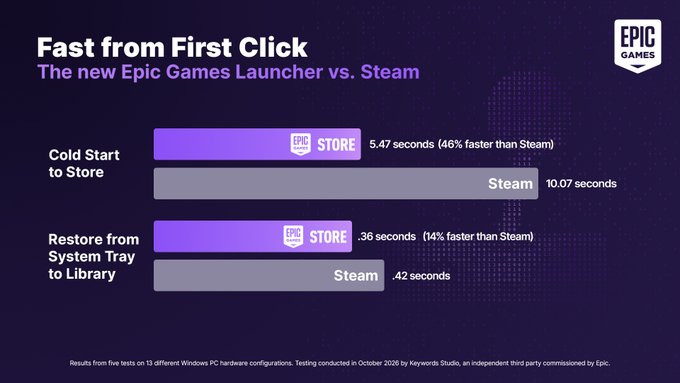
- Epic claims the Preview loads faster than the competing launcher and explicitly asks users to test the speed themselves rather than take the company's word for it.
- There are no levels or special controls: you install the Preview alongside your existing launcher, then launch games and browse the store as usual while comparing load times and responsiveness.
- The real story is the method and the marketing: a major platform holder publicly admitting it leaned on AI-assisted coding while taunting a rival, which has drawn both curiosity and heavy criticism.
Quick Facts
| Type | Desktop game store launcher (Preview build) |
|---|---|
| Devices | Windows and macOS PCs; check official site for current list |
| Price | Free download; store purchases cost extra |
| Languages | Matches your existing Epic account settings |
| Highlight | AI-assisted rebuild with a public speed challenge |
| Learning curve | None if you already use a game launcher |
| Category | Tech Buzz |
| Creator | Epic Games Store |
| Official site | launcher.epicgames.com ↗ |
| Heat | 🔥 12.3M Heat |
| Last updated |
What Epic Actually Announced, and Why It Landed So Loudly
On October 14, 2026, Epic Games announced that it had rebuilt the Epic Games Store launcher using "vibe coding," a loose industry term for writing software by describing what you want to an AI assistant and iterating on whatever it produces. The company released the result as a public Preview build and framed the whole thing as a speed contest, saying the new launcher is faster than "the other guy" and telling users not to take its word for it. The official page lives on launcher.epicgames.com.
The phrasing is what turned a routine performance update into a talking point. Platform launchers are usually discussed in dry patch notes, but Epic chose a boastful, meme-aware tone that openly references a rival without naming it. That combination of a controversial development method and a taunt aimed at a competitor gave developers, players and critics plenty to argue about within hours of the announcement.
It is worth separating the two claims inside the message. One is technical: this build starts faster and feels more responsive. The other is methodological: Epic is comfortable saying publicly that AI assistance played a major role in producing shipping software. The first claim is testable on your own machine. The second is a cultural statement about how big studios now build everyday tools, and it is the part that will keep being debated long after the speed numbers settle.
- The claim
Epic says the Preview loads faster than the competing launcher and invites users to verify that themselves instead of trusting marketing.
- The method
"Vibe coding" means building software largely by prompting an AI assistant and refining its output, which raises questions about code quality and long-term maintenance.
- The tone
Epic's announcement openly taunts "the other guy," an unusually combative style for a storefront update and a big reason the story spread.
- The date
The announcement and Preview release both landed on October 14, 2026, so the build is new and still changing.
How the Preview Works in Practice
There is no game to learn here. The Preview is a launcher, meaning its job is to start, update and organize the games you already own while giving you a storefront to browse. You download the build, install it, sign in with your existing account, and then use it exactly as you would the standard launcher. Nothing about your library, purchases or friends list changes because you are running a different client.
Performance is judged by feel and by stopwatch. The meaningful measurements are cold start time, how quickly the store page becomes usable, how fast library tiles populate, and whether scrolling and searching stay smooth under load. Because Epic is explicitly inviting comparisons, the natural test is to run the Preview and your current launcher side by side on the same machine and time the same actions in the same order.
The Preview is designed to sit alongside your existing installation rather than replace it, so you can keep playing through the stable launcher while you experiment. That also makes it easy to walk away: if the Preview misbehaves, you simply go back to what you were using. Epic has not published a detailed feature-by-feature changelog in the announcement, so check the official site for the current build notes and any known issues before you commit to it as your daily client.
- What you can measure
Cold start time, time to first usable store page, library load speed and general scroll responsiveness are the practical benchmarks.
- What you cannot assume
The announcement does not list exact supported operating systems, feature parity or system requirements, so confirm those details on the official site.
- Safe testing
Keep your existing launcher installed and treat the Preview as a second client until you are satisfied it is stable on your hardware.
Testing the Speed Claim Without Fooling Yourself
Speed comparisons are easy to get wrong. Run each launcher several times rather than once, because the first start after an update is usually slower due to caching and background work. Close other heavy applications, keep the same network conditions, and note whether you are measuring a cold start from a freshly booted machine or a warm start with the client already cached in memory. Those two numbers can differ dramatically.
Time specific actions instead of describing a vague impression. Start a stopwatch when you double-click the icon and stop it when the store page is actually clickable, not merely visible. Do the same for opening your library, searching for a title and starting an installed game. Writing the numbers down turns an argument about vibes into something you can compare honestly across both clients and across a few days of use.
Finally, remember that launcher speed is partly a server-side story. Store pages pull content from Epic's backend, so a slow page might reflect your connection or regional server load rather than the client itself. If results swing wildly between attempts, test at a different time of day before drawing conclusions. Epic's own invitation to verify the claim is reasonable precisely because this kind of measurement is something any user can do at home.
- Repeat your runs
Three to five attempts per launcher gives a far more trustworthy picture than a single dramatic stopwatch reading.
- Define your endpoint
Stop timing when the interface is genuinely usable, not when a window first appears, or you will measure the wrong thing.
- Control the variables
Same machine, same network, same time of day and the same sequence of actions for both clients.
- Watch for updates
A Preview build changes frequently, so a result from last week may not describe the version you are running today.
The Vibe Coding Debate and Who Should Care
The reaction split along predictable lines. Some developers welcomed the honesty: plenty of teams already use AI assistants for boilerplate, tooling and internal utilities, and a launcher is exactly the kind of unglamorous software where that approach is least risky. Others pointed out that shipping a storefront used by millions is not a toy project, and that AI-generated code can hide subtle bugs, security issues and maintenance debt that only surface months later.
The taunt aimed at "the other guy" amplified the criticism. Announcing a performance win is normal; framing it as a dare is a marketing choice, and it invites people to look for reasons the claim might not hold. If independent users time the Preview and find it genuinely faster, the boast looks earned. If results are mixed or inconsistent, the same message becomes an easy target, and Epic will have handed critics a headline it wrote itself.
For ordinary players, the practical takeaway is simple. If you already use the Epic Games Store, the Preview is a free, low-risk thing to try alongside your current setup, and you can judge it on your own hardware in an afternoon. If you are a developer, the more interesting question is what this signals about how major platforms will build and talk about internal tooling going forward. Either way, treat the speed claim as a hypothesis to test, not a fact to repeat.
- Who benefits most
Existing Epic users with large libraries get the clearest signal, since they can compare startup and store browsing against a client they already know well.
- The open questions
How much of the code was AI-generated, how it is reviewed and tested, and whether the Preview eventually replaces the standard launcher are all unresolved.
- What to watch next
Look for follow-up build notes, independent timing tests and whether Epic keeps the Preview separate or folds it into the main client.
Step-by-Step Guide
Find the official Preview page
Go to the official site at launcher.epicgames.com and look for the Preview download. Confirm you are on Epic's own domain before downloading anything, since launcher installers are a common target for impersonation.
Install it alongside your current launcher
Run the installer and let the Preview sit next to your existing client rather than replacing it. This keeps your stable setup intact and makes it trivial to switch back if something breaks.
Sign in and check your library
Log in with your usual Epic account and confirm your games, purchases and friends list appear correctly. If anything looks wrong, note it and report it rather than assuming it will fix itself.
Time the actions that matter to you
Measure cold start, time to a usable store page, library loading and starting an installed game. Repeat each measurement a few times and write the numbers down so you can compare fairly.
Decide whether to keep it
If the Preview feels faster and stable on your machine, use it as your daily client. If it stutters or crashes, keep the standard launcher and check the official site for newer builds before giving up on it.
Frequently Asked Questions
What is the Epic Games Launcher Preview?
It is a public test build of the Epic Games Store launcher that Epic rebuilt using AI-assisted "vibe coding" and released on October 14, 2026. It performs the same job as the normal launcher: starting games, managing updates and browsing the store. Epic says it loads faster than the competing launcher and invites users to verify that claim themselves rather than trusting the announcement.
Is the Epic Games Launcher Preview free, and where do I get it?
The Preview itself is a free download, and it is distributed through Epic's official page at launcher.epicgames.com. Games and in-store purchases are separate and cost whatever they normally cost. Because the announcement does not spell out every system requirement or supported platform, check the official site for the current build details before installing.
Does the Preview replace my existing launcher?
No. The sensible approach, and the one the Preview is designed for, is to install it alongside your current client. Your library, purchases and account stay the same, so you can keep playing through the stable launcher while you test the Preview. If it misbehaves on your hardware, you can simply go back to what you were using.
How do I actually test whether it is faster?
Time the same actions in both launchers on the same machine and network: cold start, time until the store page is clickable, library load and launching an installed game. Repeat each measurement several times, because the first run after an update is usually slower. Keep in mind that store page speed also depends on Epic's servers, so test at different times of day.
Why is everyone arguing about the vibe coding part?
Because Epic is a major platform holder openly saying AI assistance played a large role in building software used by millions of people. Supporters see it as honest and pragmatic for unglamorous tooling. Critics worry about code quality, security and long-term maintenance, and they argue that a storefront is not the right place to experiment. The taunt at a rival made the debate louder.