Key Takeaways
- Birthday Color Pattern Maker is a free web app by 猫原のし that converts birthday colors into seamless pattern images, and it runs in any modern browser on phone or desktop.
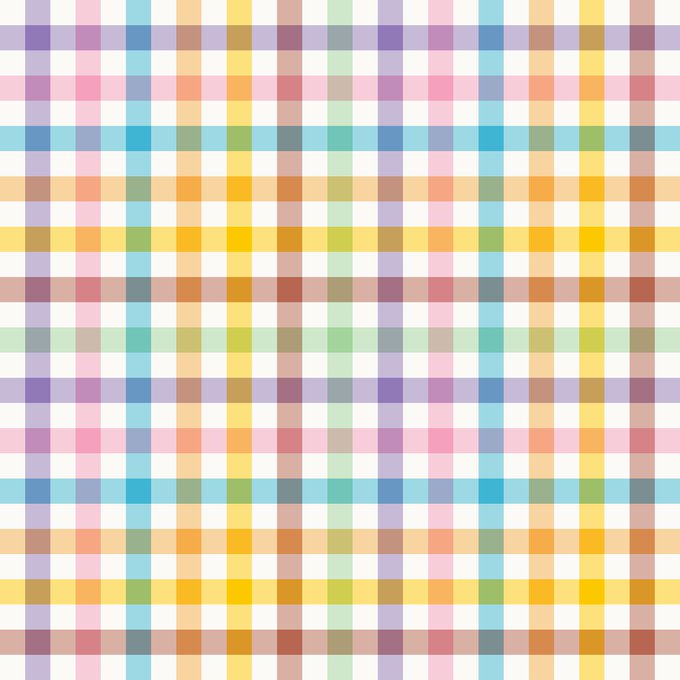
- You can select up to twelve birthday colors and pick from five pattern styles: gingham check, tartan check, grid, small floral, and checkerboard.
- Each color can represent a family member, friend, partner, or anniversary, and you also choose a base color so the finished pattern stays readable.
- It is a creative toy for fun, not a scientific color analysis tool, so treat the results as decorative and personal rather than diagnostic.
Quick Facts
| Type | Free browser-based pattern generator |
|---|---|
| Devices | Smartphones and desktop browsers |
| Price | Free to use |
| Languages | Japanese interface; check official site for details |
| Highlight | Up to 12 birthday colors, 5 pattern styles |
| Learning curve | Very easy; generate in a few clicks |
| Category | Entertainment |
| Creator | 猫原のし |
| Official site | nekoharanoshi.com ↗ |
| Heat | 🔥 16.3M Heat |
| Last updated |
What the Birthday Color Pattern Maker Actually Does
The Birthday Color Pattern Maker is a free web app released on October 13, 2026 by the Japanese creator 猫原のし. It turns birthday colors into seamless pattern images that you can use as backgrounds, gift wrap ideas, or personal keepsakes. The app is hosted on the official site, nekoharanoshi.com, and runs directly in your browser, so there is nothing to install. It works on smartphones as well as desktop computers, which makes it easy to try during a commute or while planning a celebration.
The core idea is simple: every person has a birthday color, and combining several of those colors creates a pattern that feels personal. You can assign each color to a family member, a friend, a partner, or a special anniversary. The app then arranges those colors into one of five pattern styles. Because the tool is free and browser-based, you can experiment as much as you like without creating an account or downloading software. The creator describes it as a casual way to make something that looks surprisingly polished.
- Five pattern styles
You can generate gingham check, tartan check, grid, small floral, or checkerboard patterns. Each style gives the same set of colors a completely different mood.
- Up to twelve colors
The app lets you select a maximum of twelve birthday colors. That is enough for a large family or a group of close friends without making the pattern feel cluttered.
- Adjustable base color
A separate base color sets the background of the pattern. Choosing a soft or neutral shade helps the birthday colors stand out and keeps the design readable.
- No account needed
You can open the app and start generating immediately. There is no sign-up step mentioned, and the tool is free to use on the official site.
How to Pick Colors and Generate Your First Pattern
Start by deciding whose birthday colors you want to include. The app supports up to twelve colors, but you do not need to use all of them. A good approach is to begin with two or three meaningful colors, such as your own, your partner's, and a child's. This keeps the first result clean and easy to read. If you are making a pattern for a group, you can add more colors gradually and see how the design changes. The app is forgiving, so there is no wrong way to start.
After selecting your birthday colors, choose a base color. The base color acts as the background and influences how the other colors interact. A light or muted base often works well because it prevents the pattern from looking too busy. The creator notes that even random color picks tend to look surprisingly polished thanks to this adjustable base. Once you are happy with the selection, pick one of the five pattern styles and generate the image. You can switch styles and regenerate as many times as you like.
The order in which you add colors can also affect the final look, especially in striped or checked patterns. If a particular color feels too dominant, try moving it earlier or later in the sequence, or swap it for a softer shade. Because the app runs in the browser, you can quickly compare versions on your phone. When you find a combination you like, save or share the pattern according to the options available on the official site. The whole process takes only a few minutes.
- Start small
Begin with two or three birthday colors to keep the pattern readable. Add more only when you want a richer, more complex design.
- Choose a soft base
A light or neutral base color helps the birthday colors stand out. It also makes the pattern look more intentional and less chaotic.
- Experiment with styles
The same colors can look completely different as gingham, tartan, grid, floral, or checkerboard. Try several styles before deciding.
- Reorder for balance
If one color dominates, change its position in the sequence or replace it with a lighter shade. Small adjustments can improve the whole pattern.
Ideas for Using Your Birthday Color Patterns
The most obvious use is personal keepsakes. You can generate a pattern that represents your immediate family and use it as a phone wallpaper, a notebook cover, or a custom print. Because the app produces seamless patterns, the image can be tiled or repeated without visible seams, which makes it suitable for fabric-inspired designs. If you enjoy crafts, you could use the pattern as a reference for embroidery, knitting, or scrapbooking. The small floral and gingham styles are especially suited to soft, decorative projects.
Another popular idea is gift-giving. A pattern made from the birthday colors of a friend or partner can become a personalized card, a gift tag, or a small framed print. For anniversaries, you might combine the birthday colors of both partners and choose a tartan or checkerboard style for a more formal look. The app also works well for group projects, such as a family reunion banner or a classroom activity where each student contributes a color. The creator explicitly mentions family, friends, partners, and anniversaries as use cases.
If you are sharing your pattern online or with friends, remember that it is a fun personal creation rather than an official color analysis. You can explain which colors represent which people, but there is no need to treat the result as a deep personality reading. The app is designed for lighthearted enjoyment. For any questions about saving, exporting, or sharing options, check the official site, nekoharanoshi.com, because those details may be updated by the creator.
- Personal keepsakes
Use your family's birthday colors for a phone wallpaper, notebook cover, or framed print. Seamless patterns tile nicely for larger projects.
- Thoughtful gifts
A pattern based on a friend's or partner's birthday colors makes a personalized card, tag, or small gift. It feels custom without being expensive.
- Group and family projects
Combine colors from several people for a reunion banner or classroom activity. Up to twelve colors gives room for a whole group.
- Anniversary designs
Mix two people's birthday colors and try a tartan or checkerboard style for a more formal anniversary keepsake.
How It Compares to Other Color and Pattern Generators
Most online pattern generators focus on abstract color palettes or seamless textures for design work. The Birthday Color Pattern Maker stands out because it ties the colors to personal meaning. Instead of picking random hex codes, you choose colors that represent people and occasions. That emotional layer makes the tool more engaging for casual users who are not professional designers. It also means the results are inherently shareable, because each pattern tells a small story about a family or a group of friends.
Compared with full graphic design software, this app is extremely limited. You cannot adjust individual pattern elements, change the scale of the check, or fine-tune the floral shapes. The five styles are fixed, and the main variables are the colors and the base shade. That simplicity is the point: it removes decision fatigue and lets you generate something attractive in seconds. If you need precise control, you would use a dedicated design tool. If you want a quick, personal pattern, this app is faster and more fun.
It is also worth noting that the app is browser-based and free, which lowers the barrier to entry. You do not need to install anything or create an account. The trade-off is that you depend on the official site being available and on your browser performing well. The creator has not announced a native mobile app or offline mode, so check the official site for the most current information. Overall, it is best suited for casual users, gift makers, and anyone who enjoys color-based personalization.
- Personal meaning vs. random palettes
Unlike generic pattern generators, this app connects each color to a person or occasion. That makes the result more meaningful and shareable.
- Simple by design
You cannot fine-tune pattern scale or individual elements. The five fixed styles keep the process fast and beginner-friendly.
- Browser-based and free
There is no install and no account. You just open the official site and start creating, which is ideal for quick sessions on a phone.
- Not a professional design tool
For precise control, use dedicated design software. This app is for casual, personal patterns rather than commercial-grade output.
Step-by-Step Guide
Open the app in your browser
Go to the official site, nekoharanoshi.com, on your smartphone or computer. The app loads directly in the browser, so there is no download or installation step. Make sure you have a stable internet connection.
Choose your birthday colors
Select the birthday colors you want to include. You can pick up to twelve, and each color can represent a family member, friend, partner, or anniversary. Start with two or three if you are unsure.
Pick a base color
Choose a background or base color for the pattern. A soft or neutral shade usually keeps the design readable. This step is what makes even random color combinations look polished.
Select a pattern style
Choose one of the five available styles: gingham check, tartan check, grid, small floral, or checkerboard. Each style gives your colors a different character, so try a few before deciding.
Generate, save, and share
Generate the pattern and review the result. If you want changes, adjust the colors or base shade and generate again. When you are happy, save or share the image using the options on the official site.
Frequently Asked Questions
Is the Birthday Color Pattern Maker free to use?
Yes, the app is free to use according to the creator's announcement. It runs directly in your web browser on the official site, nekoharanoshi.com, and does not require a paid subscription. You can generate patterns without creating an account. For any future changes to pricing or features, check the official site.
Does it work on smartphones?
Yes, the app is designed to work on smartphones as well as desktop browsers. Because it runs in the browser, you do not need to install a separate mobile app. The interface should adapt to smaller screens, though the exact layout may vary by device. Check the official site for the latest compatibility details.
How many colors can I use in one pattern?
You can select up to twelve birthday colors in a single pattern. That limit is generous enough for a large family or a group of friends. If you use too many colors, the pattern may look busy, so starting with two or three and adding more gradually is a good strategy.
What pattern styles are available?
The app offers five styles: gingham check, tartan check, grid, small floral, and checkerboard. Each style transforms the same set of colors into a different look. You can switch between styles and regenerate as many times as you like, which makes it easy to compare options.
Is this a scientific personality test?
No, the Birthday Color Pattern Maker is a creative tool for fun, not a scientific assessment. Birthday colors are a playful concept, and the patterns are meant for decoration, gifts, and personal keepsakes. Treat the results as a lighthearted way to celebrate people and occasions rather than as any kind of psychological analysis.