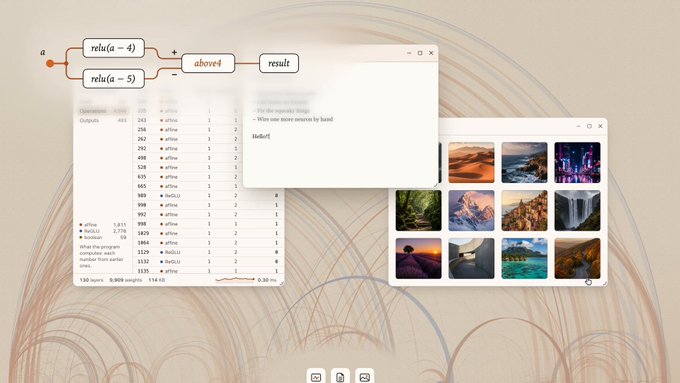
Key Takeaways
- OpenUI 1.0 is an open-source generative UI framework from Thesys, built by Rabi Shanker Guha, that lets any AI agent render interactive charts, forms and maps using your own React components.
- Instead of returning plain text, the agent emits structured UI specifications that your component library renders live in the conversation.
- The project was open-sourced about six months before the 1.0 announcement on October 15, 2026, and has reportedly passed 10K GitHub stars and 6M downloads.
- No public build, download or official page has been published yet, so the 1.0 release has only been shown in a short preview; check the official site for availability.
Quick Facts
| Type | Open-source generative UI framework |
|---|---|
| Devices | Web apps and agent front ends |
| Price | Open source; check official site for terms |
| Languages | JavaScript/React component ecosystem |
| Highlight | Agents render your own charts, forms and maps |
| Learning curve | Moderate; needs React and agent wiring |
| Category | Dev & Web Tools |
| Creator | Rabi Shanker Guha |
| Heat | 🔥 2.1M Heat |
| Last updated |
Why Thesys Built OpenUI 1.0
For three decades, software has moved toward richer interfaces, yet the smartest systems we now build often answer through a single textbox. Thesys, the team behind OpenUI, argues that this is a step backward: a language model that can reason about data still hands you paragraphs when a chart, a form or a map would communicate the same answer in a glance. OpenUI 1.0 is their attempt to close that gap for every agent, not just one vendor's assistant.
The project was open-sourced roughly six months before the 1.0 announcement on October 15, 2026, and the creator, Rabi Shanker Guha, says it has since passed 10K GitHub stars and 6M downloads. The 1.0 release extends the framework beyond a single product so that any agent, from a coding assistant to a customer-support bot, can render structured, interactive UI using components the developer already owns.
The timing matters. When ChatGPT shipped its Intelligent UI, it showed mainstream users what a generated interface can feel like, but that experience stayed inside one platform. OpenUI 1.0 positions itself as the open alternative: the same idea, portable across agents, with your design system in control rather than a fixed set of built-in widgets.
- Open by default
The framework is open source, so teams can inspect, fork and self-host the rendering pipeline instead of depending on a closed vendor's widget set.
- Your components, not theirs
You wire your existing React components into the pipeline, which means generated output inherits your branding, accessibility work and interaction patterns.
- Agent-agnostic
The 1.0 pitch is that any agent can use it, not only Thesys's own product, which makes it a layer rather than a locked-in assistant.
- Still early
No public build or official page has been published yet, so treat the 1.0 announcement as a preview and verify details on the official site.
How Generative UI Actually Works Under the Hood
The core idea is a swap in what the model returns. In a normal chat setup, the model streams tokens that become prose. With OpenUI, the agent instead emits a structured UI specification: a machine-readable description of which component to render and what data to pass into it. Your renderer reads that spec and mounts the matching component, so the user sees a live chart, form or map rather than a description of one.
Because the specification is separate from the component implementation, the same agent response can render differently in different apps. A dashboard might map a spec to a line chart, while a mobile client maps the same spec to a compact card. That separation is what makes the framework portable and what lets developers keep full control over styling, state and events.
The practical consequence is interactivity. A generated form can accept input, validate it and feed the result back to the agent for a follow-up step. A generated chart can be filtered or zoomed. This turns a single agent turn into a small application surface, which is exactly the behavior that plain text responses cannot provide.
- Structured specs, not markup
The agent describes intent, such as a chart with these series, and your code decides how to render it, which keeps output safe and consistent.
- Component mapping
You register a handful of components with the renderer, and the agent can only choose from what you have exposed, which limits surprises.
- Round-trip interaction
Events from rendered UI can be sent back into the conversation, so a submitted form becomes context for the next model call.
- Progressive rendering
Specs can stream in, letting the interface appear piece by piece instead of waiting for a complete response.
Wiring OpenUI Into Your Agent: A Practical Workflow
A sensible rollout starts small. Clone the open-source repository, run the examples, and pick one narrow use case such as a single chart or a short form. Map only the components that use case needs, then test how the agent chooses them. Keeping the first surface tiny makes it obvious whether the model is emitting valid specs or drifting into prose.
Next, connect the renderer to your agent loop. The agent needs instructions about which components exist and what data shape each expects, so prompt or tool definitions should describe the available UI options clearly. When a spec arrives, validate it against your schema before mounting anything, and fall back to a text answer if validation fails. That fallback keeps the experience usable even when the model misbehaves.
Finally, expand coverage and measure. Add components one at a time, watch where users actually interact with generated UI, and compare those sessions against plain-text replies. The goal is not to render everything as a widget; it is to render the cases where a chart, form or map genuinely answers the question faster than a paragraph would.
- Start with one component
Prove the pipeline with a single chart or form before mapping an entire design system, so failures are easy to isolate.
- Validate every spec
Treat model output as untrusted input and check it against a schema before rendering, with a text fallback when it does not match.
- Describe components precisely
The agent can only choose wisely if your tool or prompt definitions explain each component's purpose and expected data.
- Measure against text
Compare generated-UI sessions with plain replies to confirm the interface is actually helping rather than adding noise.
Where OpenUI Fits and Where It Does Not
The clearest fit is agents that already produce structured data: analytics assistants, booking flows, internal tools and support bots that collect information. In those cases a generated form or chart removes a copy-paste step and keeps the user inside the conversation. Teams with an existing React component library get the most leverage, because the generated UI can look and behave like the rest of their product.
The comparison people keep making is against plain chatbot replies and against platform-specific generated interfaces. OpenUI's advantage is portability and ownership: you are not limited to one assistant vendor, and you control the components. Its cost is integration work. You need an agent that can emit structured output, a renderer in your front end and a validation layer, which is more than dropping in a chat widget.
There are real limitations to plan for. Generated interfaces can be inconsistent if the model picks the wrong component, accessibility depends on the components you expose, and complex layouts may still be easier to build by hand. Also, because no public build or official page exists yet, the 1.0 release has only been shown in a short preview, so anyone evaluating it today should confirm current status and requirements on the official site before committing.
- Best for data-heavy agents
Analytics, booking and support agents benefit most because their answers naturally map to charts, forms and maps.
- Compared with plain chat
Generated UI trades some simplicity for interactivity, which pays off when users need to filter, submit or explore data.
- Compared with closed assistants
You gain portability and design control but take on integration and maintenance work yourself.
- Watch the availability
Since only a preview has been shown so far, verify the release status, licensing and setup steps on the official site.
Step-by-Step Guide
Check the current release status
Because OpenUI 1.0 has only been shown in a preview and no public build or official page has been published yet, start by confirming availability on the official site. Look for installation instructions, licensing and supported frameworks before planning any work.
Clone the open-source project
Once a build is available, clone the repository and run the bundled examples locally. The project was open-sourced months before the 1.0 announcement, so earlier versions and documentation may already give you a working starting point to evaluate.
Map your first component
Choose one component, such as a bar chart or a short form, and register it with the renderer. Describe its purpose and expected data shape to your agent so the model knows when to select it instead of writing text.
Connect your agent loop
Wire the renderer into your agent so structured specs are emitted and mounted in the conversation. Add schema validation and a text fallback, then test with realistic prompts to see how often the agent chooses UI correctly.
Expand and measure
Add components gradually and track how users interact with generated charts, forms and maps compared with plain replies. Keep only the surfaces that clearly improve the task, and recheck the official site for updates as the project matures.
Frequently Asked Questions
What exactly is OpenUI 1.0?
OpenUI 1.0 is an open-source generative UI framework from Thesys, created by Rabi Shanker Guha. It lets any AI agent respond with live charts, forms and maps built from your own components instead of plain text. The agent emits structured UI specifications that your front end renders, so the conversation becomes interactive rather than a wall of prose.
Is OpenUI 1.0 available to download or use right now?
As of the 1.0 announcement on October 15, 2026, no public build, download or official page has been published. The creator has only shown it in a short preview video and announcement. Earlier open-source versions may exist from the project's history, but you should check the official site for the current status before planning any integration.
How does it differ from ChatGPT's Intelligent UI?
ChatGPT's Intelligent UI showed mainstream users what generated interfaces can look like, but it lives inside one platform. OpenUI 1.0 is positioned as the open, portable alternative: any agent can use it, and you supply your own React components. That means you keep control of styling, accessibility and interaction patterns instead of accepting a fixed widget set.
What do I need to build with OpenUI?
You need an agent that can emit structured output, a web front end that can render components, and a validation layer between them. Familiarity with React and your component library is important because the generated UI is built from components you expose. Expect moderate integration work rather than a drop-in chat widget.
Is OpenUI free, and where can I follow its progress?
The project is described as open source, and the team reports significant GitHub stars and downloads, but pricing, licensing terms and future plans for 1.0 are not confirmed in the announcement. Check the official site for the repository, license and release notes, and treat any preview as a signal of direction rather than a finished product.