Key Takeaways
- Bria FIBO 2.0 is an 8B open-weights image model that combines text-to-image generation and instruction-based editing in a single architecture.
- It supports up to four reference images, masked edits for targeted regions, and JSON prompt control for precise steering of outputs.
- You can try it on Segmind, where it runs as an API; pricing is around $32 per thousand images according to editor notes.
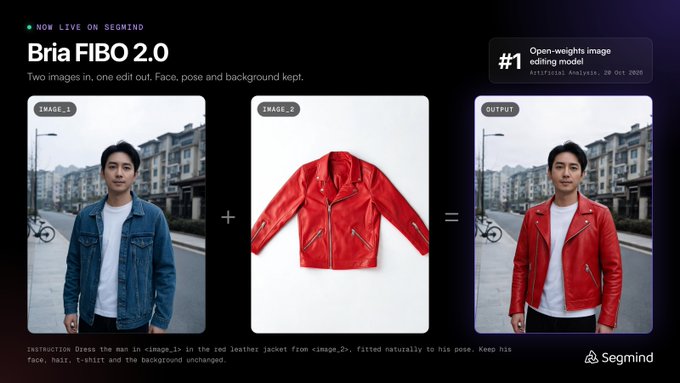
- Its fully licensed training data makes it appealing for commercial work, and it currently ranks first on Artificial Analysis' open-weights image editing leaderboard.
Quick Facts
| Type | Open-weights 8B image generation and editing model |
|---|---|
| Devices | Cloud API via Segmind; no local app mentioned |
| Price | API approx. $32 per 1,000 images (check official site) |
| Languages | Not specified; check official site |
| Highlight | JSON prompt control and fully licensed training data |
| Learning curve | Moderate; JSON prompts and masks take practice |
| Category | AI & Models |
| Creator | Segmind |
| Official site | segmind.com ↗ |
| Heat | 🔥 25.5K Heat |
| Last updated |
What Bria FIBO 2.0 Is and Why It's Getting Attention
Bria FIBO 2.0 is an open-weights image model from Bria AI, announced on October 21, 2026. It packs 8 billion parameters and handles both image generation and editing in one system, so you don't need to switch between separate models for different tasks. It recently ranked first on Artificial Analysis' open-weights image editing leaderboard, which helped it become a trending topic among AI artists and developers.
What sets it apart is its combination of open weights, fully licensed training data, and a unified architecture. Open weights mean you can inspect, fine-tune, or self-host the model if you have the technical setup, while licensed data appeals to businesses that need clear commercial usage rights. The model is currently available through Segmind, a platform that provides API access to various AI models.
The announcement highlighted three key capabilities: editing with up to four reference images, masked edits that target specific regions, and JSON prompt control for precise steering of outputs. These features make it a flexible tool for everything from quick concept art to detailed product mockups. Because it's open-weights, the community can also build on top of it, which often leads to rapid improvements and creative applications.
- Unified generation and editing
One 8B model covers text-to-image generation and instruction-based editing, so you can create and refine without switching tools.
- Open weights and licensed data
The model's weights are available for inspection or self-hosting, and its training data is fully licensed, which is a major plus for commercial projects.
- Leaderboard recognition
It currently holds the top spot on Artificial Analysis' open-weights image editing leaderboard, signaling strong performance in that category.
How Bria FIBO 2.0 Works: JSON Prompts, Masks, and Multi-Image Editing
At its core, Bria FIBO 2.0 uses a single 8B parameter architecture to handle both generation and editing. When you provide a text prompt, it generates an image from scratch. When you provide an image plus an instruction, it edits that image accordingly. This unified approach means the model learns shared representations for both tasks, which can lead to more consistent results and simpler workflows.
The JSON prompt control is a standout feature. Instead of writing a free-form text prompt, you can structure your request as a JSON object, specifying parameters like style, subject, and composition in a machine-readable format. This gives you more precise control and makes it easier to automate image generation in pipelines. It's especially useful for developers who want to integrate the model into apps or batch processes.
Masked edits let you target specific regions of an image. You provide a mask that indicates which areas should change, and the model only modifies those parts while preserving the rest. Combined with support for up to four reference images, you can guide the model with multiple visual examples, which is great for maintaining character consistency or blending styles. These controls make it a powerful tool for iterative editing.
- JSON prompt control
Structure prompts as JSON to specify attributes like style and composition, enabling precise and automatable image generation.
- Masked edits
Apply changes only to selected regions using masks, preserving the rest of the image for targeted adjustments.
- Up to four reference images
Use multiple reference images to guide style, subject, or composition, helpful for consistent characters or complex scenes.
- Single 8B model
Generation and editing share one architecture, reducing the need to switch between different models for different tasks.
How to Start Using Bria FIBO 2.0 on Segmind
The easiest way to try Bria FIBO 2.0 is through Segmind, the platform where it's currently hosted. Segmind provides API access, so you'll typically need to sign up for an account and obtain an API key. Once you have that, you can send requests to generate or edit images. The editor notes mention pricing around $32 per thousand images, but you should check the official site for current rates and any free tier.
When you first start, keep it simple. Begin with a single reference image and a straightforward JSON prompt to see how the model responds. This helps you understand the syntax and the effect of different parameters. As you get comfortable, gradually add masks and additional reference images to explore more advanced editing capabilities. The learning curve is moderate, but the control you gain is worth the effort.
For developers, the API allows integration into your own applications. You can automate batch generation, build interactive editing tools, or create custom workflows. Since the model is open-weights, you could also self-host it if you have the necessary hardware and expertise, though Segmind's API is the most accessible route for most users. Always refer to the official documentation for the latest details on endpoints and parameters.
- Sign up on Segmind
Create an account on Segmind to get API access and start experimenting with Bria FIBO 2.0.
- Start with one reference and simple JSON
Begin with a single reference image and a basic JSON prompt to learn how the model interprets instructions.
- Add masks and more references
Gradually introduce masked edits and up to four reference images to refine control and achieve complex results.
- Check official pricing
Verify current API pricing and limits on the official site, as rates may change.
Bria FIBO 2.0 vs. Other Image Models: Use Cases and Limitations
Compared to other open-weights image models like Stable Diffusion or FLUX, Bria FIBO 2.0's main differentiators are its unified generation-editing architecture, JSON prompt control, and fully licensed training data. While Stable Diffusion offers a vast ecosystem of fine-tunes and tools, FIBO 2.0's licensing makes it more straightforward for commercial use without legal ambiguity. Its leaderboard position suggests it performs well in editing tasks, but exact benchmark numbers aren't provided in the notes.
Realistic use cases include marketing teams needing to generate and edit product images with clear licensing, developers building automated image pipelines with JSON prompts, and artists who want precise control over edits with masks and multiple references. The model's ability to handle up to four reference images is particularly useful for maintaining consistency across a series of images, such as in comic creation or brand assets.
However, there are limitations. The model is 8B parameters, which is mid-sized; larger models may produce higher fidelity in some cases. The JSON prompt control, while powerful, requires learning a new syntax. Also, availability is currently limited to Segmind's API, and there's no dedicated page for the model yet, so you'll need to check the official site for updates. Self-hosting requires technical expertise and hardware. As always, verify current capabilities and restrictions on the official site.
- Licensing advantage
Fully licensed training data makes it safer for commercial projects compared to some open models with unclear data provenance.
- Unified workflow
Generation and editing in one model simplifies pipelines and reduces the need to manage multiple models.
- Limited availability
Currently accessible via Segmind's API; no standalone app or dedicated page yet, so check the official site for updates.
- Mid-sized model
At 8B parameters, it may not match the fidelity of larger models, but it offers a good balance of performance and efficiency.
Step-by-Step Guide
Create a Segmind account
Go to Segmind's official site and sign up for an account. You'll need this to obtain an API key and access Bria FIBO 2.0. Check if there's a free tier or trial credits to start experimenting without immediate cost.
Generate your first image with a JSON prompt
Use the API to send a simple JSON prompt describing the image you want. Start with basic parameters like subject and style. This helps you understand the JSON structure and see the model's output quality before moving to editing.
Try an edit with one reference image
Provide a reference image and an instruction in your API call. For example, ask the model to change the background or adjust lighting. Observe how well it follows the instruction while preserving the original content.
Add masks for targeted edits
Create a mask that highlights the region you want to change, then send it with your edit request. The model will only modify the masked area. Experiment with different mask shapes to see how precisely you can control the edits.
Combine up to four reference images
For complex tasks, supply multiple reference images to guide style, composition, or subject consistency. Use JSON prompts to specify how each reference should influence the output. This is powerful for creating cohesive series or blending concepts.
Frequently Asked Questions
What is Bria FIBO 2.0 and who made it?
Bria FIBO 2.0 is an open-weights 8B image model from Bria AI, announced on October 21, 2026. It handles both image generation and editing in one system. It recently ranked first on Artificial Analysis' open-weights image editing leaderboard and is available via Segmind's API.
How much does Bria FIBO 2.0 cost?
According to editor notes, API pricing is around $32 per thousand images, but this may change. Check the official site, segmind.com, for current rates, free tiers, and any usage limits. Since it's open-weights, you could also self-host it if you have the hardware, which might reduce costs at scale.
Can I run Bria FIBO 2.0 on my own computer?
Because it's open-weights, you can potentially download and run it locally if you have a powerful GPU and the technical know-how. However, the easiest way to use it is through Segmind's API, which requires no local setup. Check the official site for download links and hardware requirements.
What makes Bria FIBO 2.0 different from other image models?
Its key differentiators are a unified 8B architecture for both generation and editing, JSON prompt control for precise automation, support for up to four reference images, masked edits, and fully licensed training data. The licensing aspect is particularly important for commercial use, as it reduces legal risks compared to models with unclear data provenance.
Is Bria FIBO 2.0 safe for commercial use?
The model's training data is fully licensed, which is designed to make commercial use safer. However, you should always review the specific license terms and any usage restrictions on the official site. Bria AI emphasizes licensed data as a core feature, but it's your responsibility to ensure compliance with your own use case.