Key Takeaways
- Prefecture Border King is a browser-based geography quiz where you draw the borders of Japanese prefectures from memory and get scored on accuracy.
- Each round gives you 30 seconds to trace a specified prefecture's boundary using a terrain map as a guide; you can draw, pan, erase, undo and zoom.
- Your result screen shows match percentage, score, rank, line accuracy and border coverage, so you must balance precision with completeness.
- It runs on both mobile and desktop browsers, and no dedicated page exists yet; check the creator's official site, kskdazegames.com, for updates.
Quick Facts
| Type | Browser-based geography quiz game |
|---|---|
| Devices | Mobile phones and desktop browsers |
| Price | Free to play; check official site for details |
| Languages | Japanese (check official site for other languages) |
| Highlight | Draw prefecture borders from memory and get scored |
| Learning curve | Easy to start, hard to master |
| Category | Browser Games |
| Creator | KSKだぜGAMES |
| Official site | kskdazegames.com ↗ |
| Heat | 🔥 2.3M Heat |
| Last updated |
What Prefecture Border King Is and Why It's Trending
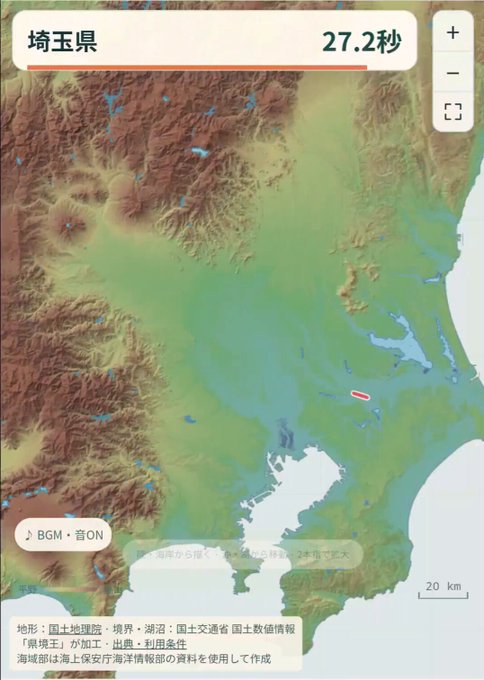
Prefecture Border King is a browser-based geography quiz game created by KSKdaze. In each round, you are asked to draw the border of a specific Japanese prefecture from memory, using a terrain map as a guide. The game then compares your line to the real border and gives you a score based on how closely you matched it. It is a simple concept that quickly becomes addictive because it tests your common sense about Japan's geography.
The game was announced on October 15, 2026, and has been gaining attention for its unique twist on map quizzes. Unlike typical multiple-choice geography games, Prefecture Border King requires you to actively recall and reproduce shapes, which is much harder than it sounds. The result is a mix of frustration and satisfaction that has made it a recent trending topic among casual gamers and geography enthusiasts alike.
The creator, KSKdaze, describes it as a game that tests your common sense. That description fits perfectly: you might think you know where a prefecture is, but drawing its exact outline is a different challenge. The game's simplicity and the shareable result screen have helped it spread quickly, with players comparing their scores and ranks. It is a fresh take on the quiz genre that appeals to both casual players and map nerds.
- Memory-based drawing
You must draw the border from memory, not trace it. The terrain map gives hints but does not show the exact line.
- Scoring with multiple metrics
Your result includes match percentage, score, rank, line accuracy and border coverage, so you get a detailed performance breakdown.
- Quick rounds
Each round lasts 30 seconds, making it easy to play in short bursts and retry immediately.
- Shareable results
The result screen is designed to be shared, which has helped the game gain popularity as players compare their common sense.
How the Drawing and Scoring System Works
When a round begins, you are given a terrain map of Japan with one prefecture highlighted as your target. You have 30 seconds to draw its border using the mouse or your finger. The game provides tools to draw, pan, erase and undo, and you can zoom in or out with the mouse wheel or a two-finger pinch on touchscreens. Coastlines and remote islands are excluded from scoring, so you only need to focus on the land borders with neighboring prefectures.
After you finish drawing, the game compares your line to the actual border and calculates several metrics. The match percentage shows how much of your line overlaps with the real border, while line accuracy measures how precise your strokes were. Border coverage indicates how much of the actual border you managed to draw. Your final score and rank are based on a combination of these factors, so you cannot simply draw a short line and hope for a high score.
The scoring system encourages a balance between precision and completeness. If you draw a very accurate but short segment, your coverage will be low. If you draw a long but sloppy line, your accuracy will suffer. The best strategy is to draw the entire border as accurately as possible within the time limit. This makes the game a true test of both memory and hand-eye coordination.
- Time limit
You have 30 seconds per round, so you must work quickly and efficiently.
- Tools available
Draw, pan, erase, undo, and zoom with mouse wheel or pinch. These help you navigate the map and correct mistakes.
- Excluded areas
Coastlines and remote islands are not scored, so you only need to draw land borders between prefectures.
- Scoring metrics
Match percentage, score, rank, line accuracy and border coverage are all shown on the result screen.
Tips and Strategies to Improve Your Score
The key to a high score is to start by identifying the general shape of the prefecture and its neighbors. Use the terrain map to spot mountains, rivers and coastlines that often form natural borders. For example, prefectures in the Kanto region have relatively straight borders, while those in Chubu are more irregular due to mountainous terrain. Familiarizing yourself with these patterns will help you draw more accurately.
Another tip is to draw the border in one continuous stroke if possible. This reduces the chance of gaps and makes your line smoother. If you make a mistake, use the undo button rather than erasing, as undo is faster and more precise. Also, practice zooming in on complex sections; a closer view helps you follow the actual border more closely. Remember that you have only 30 seconds, so prioritize the most distinctive parts of the border first.
Finally, play regularly to build your mental map of Japan. Start with prefectures you know well, then challenge yourself with less familiar ones. The game's ranking system will show your progress over time. Since the game is browser-based, you can play on your phone during a commute or on your desktop at home. The more you play, the better your common sense about Japanese geography becomes.
- Use natural features
Rivers, mountains and coastlines often define borders. Use the terrain map to guide your line.
- Draw continuously
A single smooth stroke is better than many short ones. It improves accuracy and coverage.
- Zoom for detail
Zoom in on tricky sections to follow the border precisely. Pinch or use the mouse wheel.
- Practice regularly
Repeated play builds your memory of prefecture shapes and improves your rank over time.
How It Compares to Other Geography Games and Who It's For
Prefecture Border King stands out from other geography games because it requires active drawing rather than recognition or multiple choice. Games like GeoGuessr test your ability to identify locations from photos, while Seterra focuses on clicking correct regions on a map. Prefecture Border King is more demanding because you must reproduce the shape from memory, which is a much deeper test of spatial knowledge. This makes it both more challenging and more rewarding.
The game is ideal for anyone interested in Japanese geography, from students to travelers to map enthusiasts. It is also a fun way to test your common sense, as the creator intended. However, it is not for those who want a relaxing experience; the 30-second timer and precise scoring can be stressful. If you enjoy a good mental challenge and want to learn more about Japan's prefectures, this game is for you.
As of now, there is no dedicated page for Prefecture Border King, but you can check the creator's official site, kskdazegames.com, for updates. The game runs smoothly on both mobile and desktop browsers, so you can play it anywhere. While it is primarily in Japanese, the gameplay is intuitive enough for non-Japanese speakers to enjoy. Keep an eye on the official site for any future announcements or additional features.
- Active drawing vs. recognition
Unlike most geography games, you must draw the border from memory, which is a harder skill.
- Detailed scoring
The game provides multiple metrics, giving you a clear picture of your performance and areas to improve.
- Accessibility
It works on mobile and desktop browsers, and the controls are simple enough for anyone to pick up.
- Availability
No dedicated page yet; check kskdazegames.com for the latest information and updates.
Step-by-Step Guide
Open the game in your browser
Go to the creator's official site, kskdazegames.com, and look for Prefecture Border King. Since there is no dedicated page yet, you may need to browse the site or check for announcements. The game runs directly in your browser on both mobile and desktop.
Start a round and read the prompt
Once the game loads, you will be given a prefecture to draw. The terrain map of Japan will be displayed with the target prefecture highlighted. Take a moment to recall its shape and its neighbors before you start drawing.
Draw the border using the tools
Use your mouse or finger to draw the border on the map. You can pan by dragging, erase mistakes, and undo your last action. Zoom in with the mouse wheel or a two-finger pinch to see details. Remember, you have 30 seconds.
Submit your drawing and see your score
When you are satisfied or time runs out, submit your drawing. The game will compare it to the real border and show your match percentage, score, rank, line accuracy and border coverage. Use this feedback to improve next time.
Share your result and challenge friends
After seeing your score, you can share your result screen with friends to compare ranks. The game is designed to be social, so challenge others to beat your common sense. Keep playing to climb the ranks and learn more prefectures.
Frequently Asked Questions
Is Prefecture Border King free to play?
The game is free to play in your browser. There is no information about in-app purchases or ads, so check the official site for any updates on pricing or monetization. As of now, it appears to be a free casual game.
Can I play it on my phone?
Yes, Prefecture Border King runs smoothly on both mobile phones and desktop browsers. The controls support touch, including two-finger pinch to zoom. You can play it on the go as long as you have an internet connection.
How does the scoring work?
Your drawing is compared to the actual border. The game calculates match percentage, line accuracy, and border coverage, then combines them into a score and rank. You need to balance precision with completeness to get a high score.
Is the game available in English?
The game is primarily in Japanese, but the gameplay is intuitive and does not require reading much text. The map and tools are visual, so non-Japanese speakers can still enjoy it. Check the official site for any language options.
Where can I find Prefecture Border King?
There is no dedicated page for the game yet. The creator's official site is kskdazegames.com, so check there for the latest information and availability. You can also look for announcements from KSKdaze.