Key Takeaways
- Soft Serve Simulator is a free 3D browser game by developer nog where you swirl soft-serve ice cream as high as possible.
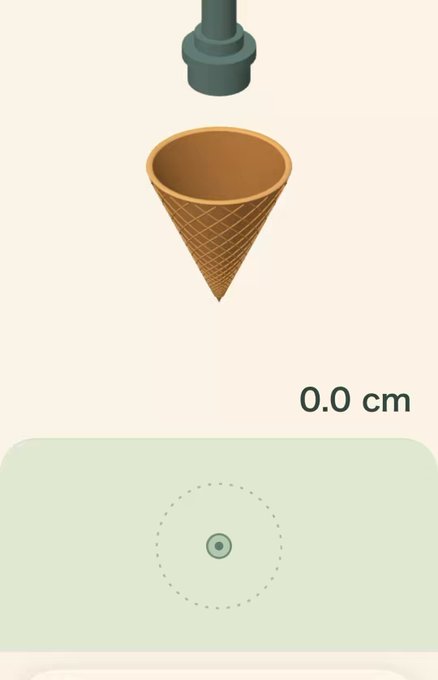
- You control a cone under a dispenser and hold the screen or mouse to release cream, watching the height in centimeters climb.
- The game runs on both smartphones and desktop browsers, requiring JavaScript and WebGL2; a portrait prompt appears on phones.
- Share your results with built-in image and video tools, and compare star ratings and centimeter heights with friends.
Quick Facts
| Type | 3D browser game |
|---|---|
| Devices | Smartphones and desktop browsers |
| Price | Free |
| Languages | Check official site |
| Highlight | Absurdly tall soft-serve stacking |
| Learning curve | Easy to start, tricky to master |
| Category | Browser Games |
| Creator | nog |
| Official site | softserve.nog.cc ↗ |
| Heat | 🔥 460.8K Heat |
| Last updated |
What Soft Serve Simulator Is and Why It's Trending
Soft Serve Simulator is a free 3D browser game created by developer nog, released on October 19, 2026. The premise is simple but delightfully absurd: you control a cone under a soft-serve dispenser and try to build the tallest possible swirl of ice cream. Nog built the game in response to requests for unrealistic ice cream heights, and that playful goal is exactly what makes it so appealing.
The game runs directly in your web browser at softserve.nog.cc, with no download or installation required. It works on both smartphones and desktop computers, though it needs JavaScript and WebGL2 enabled. On phones, the game displays a portrait prompt to guide you. Since its release, players have been sharing screenshots and clips of their towering, wobbling creations, driving its recent popularity.
- Free and accessible
No payment or account is needed; just open the site and start swirling.
- Cross-device play
Works on mobile and desktop, but requires a browser with JavaScript and WebGL2 support.
- Built for sharing
The game includes options to share images and videos of your cone, complete with star ratings and height in centimeters.
How to Play: Controls, Scoring, and Win Conditions
The controls are straightforward: you move a cone beneath the dispenser and hold the control area to release the soft-serve cream. As you hold, the cream swirls out and stacks up, and the game displays the height in centimeters in real time. Your goal is to build the tallest possible cone without it collapsing or toppling over. There is no traditional win condition; instead, you chase your personal best and compare with others.
Each run ends when your cone falls or you decide to stop. Afterward, the game shows your height and offers a retry option so you can immediately try again. You also get a star rating based on your performance, which is included in the share text along with the centimeter height. This scoring system encourages repeated attempts to beat your own records and climb the leaderboard of friends.
The game's difficulty comes from the physics of the soft-serve cream. The taller your cone, the more unstable it becomes, and slight movements can cause a wobble that leads to a collapse. There are no explicit stages or levels; the challenge scales naturally with the height you achieve. This endless, self-imposed goal structure is what keeps players coming back for 'just one more try.'
- Hold to dispense
Press and hold the control area to release cream; release to stop. The longer you hold, the higher it goes—if it doesn't fall.
- Watch the height
The centimeter counter updates live, giving you immediate feedback on your progress.
- Retry instantly
After each attempt, tap retry to start a new cone without any loading screens.
- Share your result
Use the built-in share options to send an image or video of your creation, complete with star rating and height.
Tips and Strategies for Taller Cones
Start with small, steady movements of the cone to learn how the cream responds. Rushing the swirl often leads to an uneven stack that topples early. Focus on keeping the cone centered under the dispenser and releasing the control in short bursts to build layers evenly. As you get a feel for the physics, you can gradually increase the height.
The key to tall stacks is patience and subtle adjustments. Instead of holding the button continuously, try tapping to add small amounts of cream, allowing each layer to settle before adding more. Watch the wobble: if the cone starts to lean, pause and let it stabilize. Practicing these micro-movements will help you push past your previous records.
After each run, check your height and personal best to track improvement. The star rating gives you a quick sense of how well you did, but the centimeter count is the true measure. Experiment with different rhythms and speeds to find what works best for you. Remember that even the tallest cones eventually fall—the fun is in the attempt.
- Master the micro-movements
Small, controlled taps of the dispenser create more stable layers than holding continuously.
- Center the cone
Keep the cone directly under the dispenser to avoid lopsided stacks that collapse early.
- Learn from each fall
After a collapse, note the height and adjust your technique for the next attempt.
How It Compares to Other Casual Browser Games
Soft Serve Simulator shares the pick-up-and-play appeal of other casual web games like stackers and physics puzzlers, but its focus on a single, silly goal sets it apart. Instead of levels or time limits, it offers a pure high-score chase that is easy to understand and hard to put down. The 3D graphics and realistic cream physics add a layer of polish that makes each attempt satisfying.
Compared to similar browser-based stacking games, Soft Serve Simulator stands out for its whimsical premise and social sharing features. The built-in image and video sharing, complete with star ratings and centimeter heights, encourages friendly competition. However, it lacks deeper progression systems or unlockables, so its longevity depends on your own motivation to beat your best.
The game is designed for quick sessions, making it ideal for a short break. It runs smoothly on both mobile and desktop, though older devices may struggle with WebGL2 requirements. If you enjoy lighthearted physics challenges and want a free, no-download experience, Soft Serve Simulator is a delightful diversion. Just be warned: it's harder than it looks to build that perfect tower.
- Pure high-score chase
No levels or story—just you, the dispenser, and the quest for height.
- Social sharing built in
Share your results easily, which fuels friendly competition.
- Lightweight and free
No downloads or purchases; play instantly in your browser.
Step-by-Step Guide
Open the game in your browser
Go to softserve.nog.cc on your smartphone or desktop. Ensure JavaScript and WebGL2 are enabled; on phones, you'll see a portrait prompt.
Position your cone
Use the on-screen controls or mouse to move the cone under the dispenser. Center it carefully to avoid uneven stacking.
Hold to dispense cream
Press and hold the control area to release the soft-serve. Watch the height counter climb as the cream swirls out.
Adjust and stabilize
Release the control to stop the flow. Make small movements to keep the stack balanced and prevent wobbling.
Share your result
When your cone falls or you stop, review your height and star rating. Use the share buttons to send an image or video to friends.
Frequently Asked Questions
Is Soft Serve Simulator free to play?
Yes, Soft Serve Simulator is completely free to play. There is no cost to access the game at softserve.nog.cc, and you can play directly in your browser without any downloads or purchases. Just open the site and start swirling.
What devices can I play it on?
You can play on both smartphones and desktop computers. The game requires a browser with JavaScript and WebGL2 support. On phones, it displays a portrait prompt to optimize your experience. Most modern devices should handle it smoothly.
How do I get a higher score?
To build taller cones, use small, steady movements and avoid rushing. Tap the dispenser in short bursts to create even layers, and keep the cone centered. Practice patience and subtle adjustments to stabilize the stack as it grows.
Can I share my creations?
Yes, the game includes built-in sharing options. After each run, you can share an image or video of your cone, complete with your star rating and height in centimeters. This makes it easy to compare results with friends.
What if the game doesn't load?
If the game doesn't load, check that your browser supports WebGL2 and that JavaScript is enabled. Try updating your browser or switching to a different one. For specific requirements, refer to the official site.