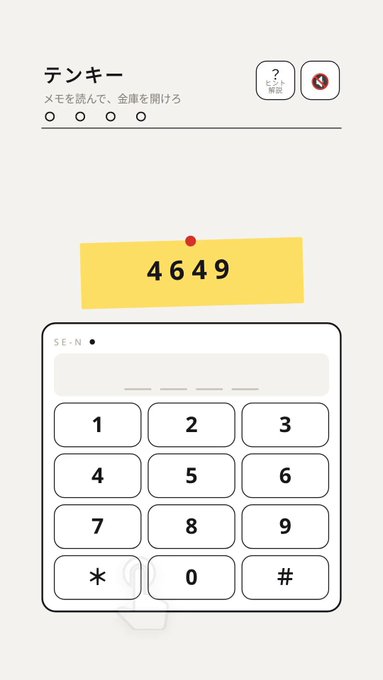
Key Takeaways
- Tenkey is a free browser puzzle by ダンボーイ, playable on se-n.com on phones and desktops without any download.
- You read memo clues and enter codes on a number pad to open a safe; the current build includes two endings.
- The key trick is matching each memo line to a key position on the number pad rather than guessing random digits.
- If you get stuck, tap the dots to revisit previously opened safes for hints, and expect a full run to take about three minutes.
Quick Facts
| Type | Browser puzzle game |
|---|---|
| Devices | Smartphones and desktop browsers |
| Price | Free |
| Languages | Japanese (check official site for others) |
| Highlight | Memo clues mapped to keypad positions |
| Learning curve | Low; about 3 minutes per run |
| Category | Browser Games |
| Creator | ダンボーイ |
| Official site | se-n.com ↗ |
| Heat | 🔥 971.3K Heat |
| Last updated |
What Tenkey Is and Why It Fits in a Coffee Break
Tenkey is a short browser puzzle created by ダンボーイ and released on October 17, 2026. The premise is simple: you find handwritten memos and use them to open a safe by entering codes on an on-screen number pad. The whole experience is designed to last about three minutes, so it fits neatly into a coffee break or a commute. It runs directly in the browser on se-n.com, works on smartphones, and costs nothing to play.
The game leans on the familiar layout of a ten-key number pad, the grid of digits 0 through 9 arranged in rows. Instead of asking you to guess random numbers, the memos describe positions or relationships on that grid. That makes Tenkey feel more like a tiny deduction exercise than a brute-force guessing game. The current build includes two endings, which gives completionists a reason to replay and look for the alternate path.
Because it is a web game, there is no install step and no store listing to hunt down. You open the page, read the first memo, and start pressing keys. The interface is built for touch as well as mouse and keyboard, so tapping digits on a phone feels natural. The game's compact scope is part of its charm: it does not ask for an account or a long commitment, and it respects the three-minute promise in its description.
- Built for quick sessions
The creator describes it as a three-minute web puzzle, so you can finish a run in one sitting without saving progress.
- Number-pad logic, not random guessing
Memos point to key positions on the ten-key grid, so reading carefully beats mashing digits.
- Two endings to find
The current build hides a second ending, giving you a reason to replay after your first successful safe opening.
How the Memo-to-Keypad Deduction Works
At its core, Tenkey asks you to translate written clues into key presses. Each memo line corresponds to a specific key position on the number pad rather than to an abstract digit. For example, a memo might describe a location like a corner or a middle row, and your job is to figure out which digit sits there. Once you map the clue to a position, you press that key on the on-screen pad to enter your guess.
The game gives you feedback through an answer-check overlay. When you press keys, the overlay can reveal memo characters on the pressed keys, helping you see how your input relates to the clue text. That visual feedback is the heart of the puzzle: it turns each attempt into information. If a key lights up with a matching character, you know you are on the right track; if not, you can adjust your interpretation of the memo.
The number pad layout itself is a clue. Standard ten-key pads arrange 7-8-9 on the top row, 4-5-6 in the middle, and 1-2-3 on the bottom, with 0 below. Memos may reference rows, columns, or relative positions, so keeping that grid in mind is essential. The game does not spell out every rule in advance, so part of the challenge is noticing how the memo language maps onto the pad. That discovery moment is what makes the puzzle satisfying.
- Read the memo as a map
Treat each line as a description of a position on the keypad grid, not as a loose hint about a number.
- Watch the overlay
The answer-check overlay reveals memo characters on pressed keys, so use it to test your interpretation before committing.
- Keep the standard layout in mind
Rows and columns on a ten-key pad are consistent, so use that structure to decode positional clues.
Step-by-Step: From First Memo to Second Ending
Start by reading every memo line before you press anything. The clues often work together, and understanding the full set prevents you from fixating on one line. Once you have a theory, enter it on the keypad and watch the overlay for feedback. If a pressed key reveals a memo character, that is a strong signal that your positional reading is correct. Adjust only the parts that do not match.
When you open a safe, the game lets you tap dots to revisit previously opened safes. Those revisits are not just for nostalgia; they can provide hints for the current puzzle. If you feel stuck, go back to an earlier safe and re-read its memo with fresh eyes. The second ending likely requires a different interpretation or a specific sequence, so pay attention to any memo lines that seemed irrelevant the first time.
A full run takes about three minutes, but do not rush the reading phase. The puzzle rewards careful observation more than speed. If you are playing on a phone, make sure you can see the memo text and the keypad at the same time; rotating your device or zooming slightly can help. On desktop, a larger window makes the overlay easier to read. Once you have both endings, you have seen the core of what Tenkey offers.
- Read all memos first
The clues are designed as a set, so scanning them all before entering a code saves trial and error.
- Use the dots to revisit
Tapping the dots lets you return to earlier safes, which can supply hints when you are stuck.
- Aim for the alternate path
After your first ending, replay with a different reading of the memos to uncover the second ending.
How Tenkey Compares with Other Casual Web Puzzles
Tenkey sits in the same family as other short browser puzzles that use a single screen and a clear win condition. What sets it apart is the ten-key pad as both interface and clue system. Many casual web games rely on hidden-object hunting or word association; Tenkey instead asks you to think spatially about a familiar grid. That makes it feel a bit like a miniature escape room, but without the sprawling inventory management.
Compared with longer escape-room-style browser games, Tenkey is deliberately tiny. You will not spend an hour collecting items or combining objects. The trade-off is depth: the puzzle is short, and once you know the solution, replay value comes mainly from finding the second ending. If you enjoy logic puzzles that fit in a single sitting, that brevity is a feature. If you want a sprawling adventure, look elsewhere.
The game is free and runs on both phones and desktops, which lowers the barrier to entry. It does not require an account, and the creator has not advertised additional platforms or paid content. For readers who want to check availability or language options, the official site at se-n.com is the place to look. As with any small web game, features can change, so verify the current build before assuming a specific ending or control scheme.
- Spatial deduction, not item hunting
Tenkey's clues are about key positions, making it more like a logic grid than a hidden-object game.
- Short and self-contained
A run lasts about three minutes, so it is ideal for a quick break rather than a long session.
- Check the official site for details
Language options and any future updates are best confirmed on se-n.com, since the build may evolve.
Step-by-Step Guide
Open the game in your browser
Go to se-n.com on your phone or desktop. The game loads directly in the browser with no download or account. Make sure your screen is large enough to read the memo text and see the keypad at the same time.
Read every memo line carefully
Before pressing any keys, read all the memos. They describe positions on the number pad rather than random digits. Look for words about rows, columns, corners, or relative placement, and form a theory about which keys they point to.
Enter your code on the keypad
Tap or click the digits on the on-screen ten-key pad to enter your guess. Watch the answer-check overlay: it can reveal memo characters on the keys you pressed. Use that feedback to confirm or adjust your interpretation of the clues.
Revisit earlier safes for hints
If you get stuck, tap the dots to return to previously opened safes. Re-reading their memos with fresh eyes often reveals a detail you missed. This is especially useful when you are hunting for the second ending.
Replay for the alternate ending
After you open the safe once, start again and try a different reading of the memos. The current build includes two endings, so a second run with a new interpretation is the way to see the other outcome.
Frequently Asked Questions
Is Tenkey free to play?
Yes, Tenkey is free to play directly in your browser on se-n.com. There is no download, and the creator has not mentioned any paid content. As with any web game, check the official site for the current status in case anything changes.
What devices can I play Tenkey on?
Tenkey works on smartphones and desktop browsers. Because it is a web game, you only need a modern browser and an internet connection. The touch-friendly keypad makes it comfortable on a phone, while a larger screen helps with reading the memos.
How long does it take to finish?
The creator describes Tenkey as a three-minute web puzzle, so a single run is short. Finding both endings may take a few extra minutes of replaying and re-reading clues. It is designed to fit into a quick break rather than a long session.
What is the trick to solving the codes?
The key is to treat each memo line as a description of a position on the ten-key number pad, not as a random digit hint. Match the words to rows, columns, or corners, then press the corresponding keys. Use the answer-check overlay to see if your interpretation is correct.
Are there multiple endings?
Yes, the current build includes two endings. After you open the safe once, replay with a different reading of the memos to find the alternate outcome. If you are stuck, revisit earlier safes using the dots for hints.