Key Takeaways
- Bonsai 2 is PrismML's second-generation family of ternary open models in 2B, 4B and 9B sizes, built on Qwen3.5 and licensed under Apache 2.0.
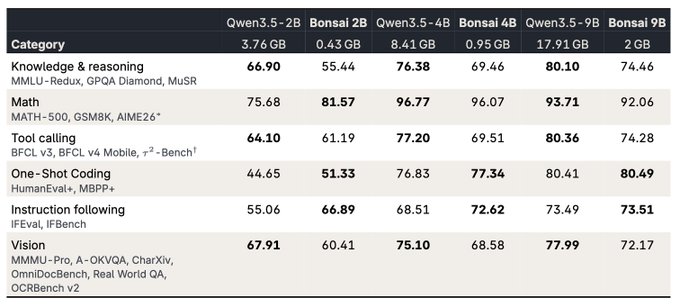
- Ternary weights shrink the on-device footprint dramatically: about 0.43GB for 2B, 0.95GB for 4B and 2.0GB for 9B, which is small enough for phones, Macs and wearables.
- The release targets practical local-assistant behavior: instruction following, fewer repetitive loops, tool calling on mobile and concise answers, with the 9B using roughly 40% fewer tokens on standard instruction and everyday math tasks.
- No public build, download or official page has been published yet; PrismML has only shown a short preview, so treat specs as announced rather than verified until the official site confirms them.
Quick Facts
| Type | Open ternary language models with vision and tool calling |
|---|---|
| Devices | Phones, Macs, personal computers and wearables |
| Price | Not announced; Apache 2.0 license suggests free use |
| Languages | Not confirmed; check the official site |
| Highlight | 9B-class model in roughly 2.0GB on-device |
| Learning curve | Easy for chat; moderate for local setup and tool calling |
| Category | AI & Models |
| Creator | PrismML |
| Heat | 🔥 324.8K Heat |
| Last updated |
What PrismML's Bonsai 2 Actually Is
Bonsai 2 is a family of compact AI models from PrismML, announced on October 15, 2026, as the successor to the first-generation Bonsai 1.7B, 4B and 8B. The new lineup covers 2B, 4B and 9B sizes, all built on Qwen3.5 and released under the Apache 2.0 license, which generally allows commercial and personal use with few restrictions. PrismML describes the family as a foundation for bringing practical agentic functionality to local applications on personal computers, phones and wearables.
The defining idea is ternary weights. Instead of storing each weight as a full-precision number, ternary models constrain weights to three values, which cuts memory use and can speed up inference on ordinary hardware. That is why the announced footprints are so small: about 0.43GB for the 2B, 0.95GB for the 4B and 2.0GB for the 9B. For comparison, most 9B-class models at standard precision need several gigabytes just for weights, before any runtime overhead.
PrismML also says the Bonsai 2 family now includes four sizes spanning 2B to 27B parameters, so the 2B, 4B and 9B are the compact end of a broader range. The company frames the release around what makes small models genuinely useful as local assistants: following instructions, avoiding repetitive loops, calling tools on mobile devices and answering without unnecessary output. No public build or official page exists yet, so these are announced capabilities rather than independently tested results.
- Ternary weights, tiny footprints
Three-valued weights are the reason a 9B model can be announced at roughly 2.0GB. Expect some quality trade-off versus full-precision models, which is the usual cost of extreme compression.
- Built on Qwen3.5
PrismML did not train from scratch; Bonsai 2 derives from the Qwen3.5 line. That means its strengths and quirks will partly reflect that base model family.
- Apache 2.0 licensing
The permissive license is a major draw for developers who want to ship local assistants in commercial apps without heavy legal review.
- Four sizes, 2B to 27B
The family extends well beyond the three headline models, giving you room to scale up if the compact tiers are not strong enough for your task.
Reasoning, Vision and Tool Calling in a 2GB Package
PrismML positions Bonsai 2 as more than a chat toy. Each tier is said to add stronger reasoning, visual understanding and tool calling, which together cover the three jobs people most want from a local assistant: thinking through a question, looking at an image, and taking an action through another app or service. Visual understanding means the model can accept images alongside text, useful for reading screenshots, labels or photos without sending anything to a server.
Tool calling is the piece that turns a model into an agent. On a phone, that could mean letting the assistant trigger a calendar entry, a search or a device function through a defined interface. PrismML specifically highlights tool calling on mobile devices, which is harder than on desktop because of memory limits and background-process restrictions. If it works as described, it would let lightweight apps offer agent-style features without a cloud round trip.
The efficiency claim is the most concrete number in the announcement: the 9B model uses roughly 40% fewer tokens on standard instruction-following and everyday math tasks. Fewer tokens means shorter outputs and faster responses, which matters on battery-powered devices. PrismML pairs this with a focus on avoiding repetitive loops, a common failure mode in small models that can otherwise spiral into repeated phrases. These are announced figures, not published benchmark tables, so verify them once the models are actually available.
- Vision without the cloud
Image understanding on-device keeps photos and screenshots private. Check the official site for which image formats and resolutions are supported.
- Tool calling as the agent hook
This is what separates an assistant from a chatbot. Developers will need to define tools and permissions themselves, so expect setup work.
- Token efficiency as a battery feature
Roughly 40% fewer tokens on instruction and math tasks translates into shorter waits and less drain on a phone.
- Loop resistance
Small models often repeat themselves; PrismML explicitly targets this, which matters most in long back-and-forth conversations.
How to Run Bonsai 2 Locally Once It Ships
Because no public build exists yet, the practical workflow below is a preparation plan rather than a live tutorial. Start by deciding which tier matches your device. The 2B at about 0.43GB is the natural first test on a phone, since it leaves plenty of memory for the operating system and your app. The 4B at roughly 0.95GB is a middle ground, and the 9B at about 2.0GB is the tier PrismML frames as the strongest compact option, best suited to a Mac or a recent high-memory phone.
When files do appear, expect a local runtime rather than a single app. Open-weight models are typically loaded by inference engines that handle quantization, memory mapping and tokenization. You download the weights, point the runtime at them, and then interact through a chat interface or an API the runtime exposes. On phones, this usually means an app that bundles the runtime; on Macs, a desktop tool is more common. Confirm the exact format and supported runtimes on the official site before downloading anything.
Test in a deliberate order. First, check raw speed with short prompts to see whether responses feel instant or sluggish. Second, test instruction following with a multi-step request, since that is where small models usually break down. Third, try a vision task with a clear image. Fourth, exercise tool calling if your runtime supports it. Keep notes on where quality drops, because the honest answer for most people is that the smallest tier handles simple tasks well and struggles with complex reasoning.
- Match tier to hardware
Start with 2B on a phone and move to 9B on a Mac. Running the largest model on weak hardware usually produces slow, frustrating results.
- Verify the runtime first
Weights alone do nothing. Confirm which inference engine and file format PrismML supports before you plan an integration.
- Benchmark your own tasks
Published token-efficiency claims are averages. Your workload, language and prompt style may behave differently, so measure before committing.
How Bonsai 2 Compares and Where It Falls Short
The obvious comparison is against other compact open models, including the Qwen3.5 line Bonsai 2 is based on and other small models designed for edge devices. Bonsai 2's differentiator is not raw capability but footprint: a 9B-class model announced at roughly 2.0GB is unusually small, and the Apache 2.0 license makes it easy to embed. If you mainly need cloud-grade reasoning, a larger hosted model will still win. If you need privacy, offline operation and low memory use, the trade-off favors Bonsai 2.
Ternary compression is also the main risk. Aggressive quantization can degrade nuanced tasks such as long-form writing, precise math and multi-step planning, even when short answers look fine. PrismML's claims about reasoning and loop avoidance are promising, but without published benchmarks or a downloadable build, they remain unverified. Treat the announced token savings as a design goal until independent testing confirms it.
The biggest limitation right now is availability. There is no public build, no download and no official page, only a short preview and announcement. That means you cannot run Bonsai 2 today, and any tutorial claiming otherwise should be treated with suspicion. The family is aimed at developers building local assistants for phones, Macs, computers and wearables, plus privacy-focused users who want capable AI without a server. If you are in that group, the right move is to watch the official site for release details.
- Footprint versus fidelity
Bonsai 2 wins on size and portability, but full-precision and larger hosted models will likely outperform it on hard reasoning tasks.
- Privacy is the real selling point
Fully offline chat and vision mean your data never leaves the device, which no cloud API can match.
- Unverified until release
No benchmarks, no downloads and no official page yet. Check the official site for confirmed specs, formats and supported devices.
- Best for builders, not casual users
Expect integration work with a runtime and tool definitions. Casual users may prefer waiting for a packaged app.
Step-by-Step Guide
Confirm the release status
Check PrismML's official site for a public build, model card or download link. As of the announcement, only a short preview has been shown, so do not download weights from unofficial mirrors.
Pick your tier by device
Choose the 2B at about 0.43GB for a first phone test, the 4B at roughly 0.95GB as a middle option, or the 9B at about 2.0GB for a Mac or high-memory phone. Smaller tiers load faster and leave more memory free.
Set up a local runtime
Install an inference engine that supports the model format PrismML publishes, then load the weights locally. On phones this is usually an app that bundles the runtime; on Macs it is typically a desktop tool.
Test speed, instructions and vision
Run short prompts to gauge latency, then a multi-step instruction to check compliance, then an image task to verify visual understanding. Note where quality drops so you know which tier fits your real workload.
Try tool calling and tune output
If your runtime supports tool calling, define one simple action and test it end to end. Adjust prompts to keep answers concise, since the models are tuned to avoid unnecessary output and repetitive loops.
Frequently Asked Questions
Can I download and run Bonsai 2 right now?
No. PrismML has only shown a short preview and announcement, and no public build, download or official page has been published yet. Anything claiming to be a Bonsai 2 download today should be treated as unofficial and potentially unsafe. Watch the official site for the real release.
What does ternary mean, and why does it make the models so small?
Ternary models constrain their weights to three possible values instead of full-precision numbers. That drastically reduces the memory needed to store the model, which is why the 2B is announced at about 0.43GB and the 9B at roughly 2.0GB. The trade-off is that extreme compression can reduce quality on complex tasks.
Is Bonsai 2 free, and can I use it commercially?
The models are released under the Apache 2.0 license, which generally permits personal and commercial use with few restrictions. PrismML has not announced pricing because there is no public build yet. Confirm the final license terms and any usage conditions on the official site once they are published.
How does Bonsai 2 compare with Qwen3.5 or other small models?
Bonsai 2 is built on Qwen3.5, so it inherits much of that family's behavior while adding ternary compression for much smaller footprints. Its advantage is running a 9B-class model in about 2GB on a phone or Mac. Larger hosted models will still be stronger for heavy reasoning, and no independent benchmarks exist yet.
Which devices will run it best, and what should I check first?
PrismML targets personal computers, phones, Macs and wearables, with the 2B suited to phones and the 9B better on a Mac or high-memory device. Before installing anything, check the official site for supported runtimes, file formats and memory requirements, since those details determine whether it runs smoothly.