Key Takeaways
- Day Schedule Builder is a browser game by Todonero, the Japanese developer known for the potato-peeling game, announced on October 20, 2026.
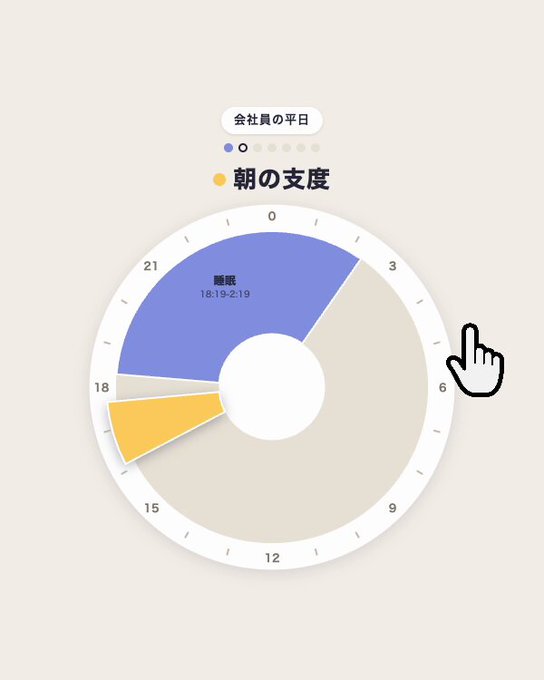
- The premise is simple: you arrange one day's activities and appointments into time slots and see how that day turns out.
- It is a web game for mobile and desktop browsers, so no app install or account is expected, but the exact play page is not yet confirmed.
- Scoring, win conditions, and save or calendar-import features are unconfirmed; check the official site, x282665.com, for updates.
Quick Facts
| Type | Casual browser game about planning one day |
|---|---|
| Devices | Mobile and desktop browsers |
| Price | Expected free in browser; not confirmed |
| Languages | Japanese announcement; other languages unconfirmed |
| Highlight | Turns a daily timetable into a playable puzzle |
| Learning curve | Likely quick to grasp; rules not yet confirmed |
| Category | Browser Games |
| Creator | トドネロ |
| Official site | x282665.com ↗ |
| Heat | 🔥 1.3M Heat |
| Last updated |
What Day Schedule Builder Actually Is
Day Schedule Builder is a small browser game from Todonero, a Japanese developer also known for the potato-peeling game. The creator announced it on October 20, 2026 with the simple description that they had made a game about building a single day's schedule. That is the whole pitch: not a calendar, not a productivity tool, but a game whose subject is the daily timetable itself.
The premise matters because it flips something boring into something playful. Most people associate scheduling with work apps and reminders. Here, arranging activities and appointments into time slots becomes the challenge you are trying to solve, and the resulting day is the outcome you watch. The exact rules, scoring, and win conditions are not yet confirmed.
Todonero's earlier work suggests a taste for tiny, funny, oddly specific ideas, and this fits that pattern. It is a web game, so it is expected to run in standard browsers like Safari and Chrome on phones and computers. No dedicated page for this title has been confirmed yet; the creator's official site is x282665.com, which is where updates would appear.
- Not a calendar app
Day Schedule Builder is presented as a game, not a scheduling utility. There is no confirmed Google Calendar integration or export feature.
- One day, one puzzle
The scope is deliberately narrow: you plan a single day rather than a week or month, which keeps sessions short and repeatable.
- From a known creator
Todonero also made the potato-peeling game, so fans of small, quirky Japanese browser games have a reason to watch this release.
How the Schedule Puzzle Likely Works
Based on the announcement, the core loop is arranging a full day's plans. You would place activities and appointments into time slots, building a timetable from morning to night. Once the day is assembled, you see how it plays out. That structure is common in casual web games: you make choices, the game resolves them, and you learn whether your plan was good, bad, or funny.
What makes a schedule interesting as a game is conflict. Real days have overlapping demands, limited hours, and activities that take longer than expected. A game version can exaggerate those tensions, so a packed morning might collapse, or a lazy afternoon might unlock something unexpected. The exact scoring and win conditions are not yet confirmed, so treat any specific rule you see elsewhere as speculation.
Controls are also unconfirmed, but the format strongly suggests simple input. On a phone, tapping and swiping to move or place schedule items would be natural. On a desktop browser, mouse dragging would do the same job. The Japanese reference material describes tap and swipe on smartphones and mouse operation on PC, which fits a lightweight browser game that starts instantly without downloads.
- Placing activities into slots
The likely core action is choosing activities and dropping them into times of day. The game then evaluates the day you built.
- Conflict as the challenge
Good schedule games create tension between too many plans and too few hours, so expect trade-offs rather than a free-form planner.
- Short sessions
Because the unit is one day, a full run should be quick, making it easy to retry with a different arrangement.
How to Try It and What to Check First
The honest status is that no dedicated play page for Day Schedule Builder has been confirmed. The announcement exists, and the creator's official site is x282665.com, but a direct link to the game itself has not been verified. If you want to play right now, the practical move is to check that official site and look for a new browser game listing from Todonero.
When a page does appear, expect a standard browser game experience. You open it in Safari, Chrome, or another modern browser on your phone or computer, and it starts without an app install or account registration. That is how most casual web games work, and the Japanese reference material describes exactly this kind of instant browser access.
Before you invest time, verify a few things on the official page: whether the game is free, whether it supports languages other than Japanese, whether progress is saved, and whether it works on your device. None of those details are confirmed yet. If a page claims calendar syncing or account features, treat it cautiously until the creator confirms it.
- Start at the official site
Go to x282665.com and look for the latest game from Todonero. That is the most reliable place for a confirmed play link.
- Check language support
The announcement is in Japanese. Whether an English or other-language version exists is unconfirmed, so check before assuming.
- Test on your device
Browser games usually work on both phones and computers, but confirm the controls feel right on your screen before a long session.
How It Compares to Other Casual Browser Games
Day Schedule Builder sits in the same broad family as other tiny Japanese browser games: a single clever idea, simple controls, and a short loop you can replay. Todonero's potato-peeling game is a good reference point. Both take an ordinary activity and turn it into a playful challenge, which is a reliable formula for casual web games that spread by word of mouth.
Compared with bigger simulation games, this one is deliberately small. It is not trying to be a life simulator or a full calendar system. Its appeal is the joke and the puzzle: can you build a day that works, and what happens when you do not? That narrow focus is a strength for short breaks, but it also means players who want deep progression may find it thin.
The main limitation right now is information. Scoring, win conditions, save features, and platform details are all unconfirmed. If you enjoy quick browser puzzles and odd everyday themes, this is worth watching. If you need a guaranteed, fully documented game today, wait until the creator publishes a dedicated page and confirms the rules.
- Similar in spirit to the potato-peeling game
Both games take a mundane task and make it the center of a small, funny challenge, which is Todonero's signature style.
- Lighter than life simulators
Do not expect deep progression or long-term management. The scope is one day and one puzzle at a time.
- Best for short breaks
Casual browser games like this fit a few minutes of play, especially on a phone, rather than long dedicated sessions.
Step-by-Step Guide
Check the official site for a play link
Go to x282665.com and look for the newest game from Todonero. No dedicated page for Day Schedule Builder has been confirmed yet, so this is where a link would appear first. If nothing is listed, the game may still be in preview.
Open it in your browser
Once a page exists, open it in Safari, Chrome, or another modern browser on your phone or computer. Browser games like this typically start without an app download or account signup, so you can begin immediately.
Learn the controls
Expect simple input: tapping and swiping on a phone, or mouse dragging on a desktop. Move activities and appointments into the day's time slots. The exact control scheme is unconfirmed, so follow any on-screen instructions.
Build your day and see the result
Arrange a full day's plans from morning to night, then let the game resolve what happens. The scoring and win conditions are not yet confirmed, so pay attention to feedback and try different arrangements to learn what the game rewards.
Retry with a new plan
Because the unit is a single day, runs should be short. Change one or two choices, such as swapping a busy block for a rest period, and compare outcomes. That experimentation is likely the fastest way to understand the rules.
Frequently Asked Questions
Is Day Schedule Builder free to play?
The game is expected to be free in a browser, based on how Todonero's previous browser games work, but this has not been officially confirmed for this title. There is no confirmed app download or account requirement. Check the official site, x282665.com, for the final pricing and access details before you play.
Where can I actually play it right now?
No dedicated play page for Day Schedule Builder has been confirmed yet. The announcement exists, and the creator's official site is x282665.com, but a direct link to the game itself has not been verified. Your best option is to check that site for a new listing from Todonero.
Does it work on phones and computers?
It is a browser game, so it is expected to run on both mobile phones and desktop computers through standard browsers like Safari and Chrome. The Japanese reference material describes tap and swipe controls on smartphones and mouse controls on PC. Specific device support is not officially confirmed, so test it on your own device.
Can I connect it to Google Calendar or save my schedule?
No calendar integration or save feature has been confirmed. The creator presented this as a game, not a productivity tool, so it is unlikely to sync with your real calendar. If a page claims those features, treat it cautiously until Todonero confirms it on the official site.
What are the rules and win conditions?
The exact rules, scoring, and win conditions are not yet confirmed. The core idea is that you arrange one day's activities and appointments into time slots and then see how the day plays out. Until the creator publishes a dedicated page, any specific rule you read elsewhere should be treated as speculation rather than fact.