Key Takeaways
- Moji Blade is a free browser game by ru where any character or emoji becomes a 3D spinning top that battles others in an arena.
- Your chosen character's shape, font, area, roundness, and pointed tips affect its speed, power, stability, and critical hits.
- New stages add rainbow boost pads, elastic rings that bounce tops back, and rotating floors that reverse direction over time.
- No public build or official page has been published yet; the creator has only shown a short preview, so watch for the release.
Quick Facts
| Type | Browser-based casual battle game |
|---|---|
| Devices | Mobile phones and desktop browsers |
| Price | Free to play |
| Languages | Check the official site for language options |
| Highlight | Any character or emoji becomes a 3D top |
| Learning curve | Easy to start, depth in character and font choice |
| Category | Browser Games |
| Creator | ru |
| Heat | 🔥 34.4K Heat |
| Last updated |
What Moji Blade Is and Why It Is Catching On
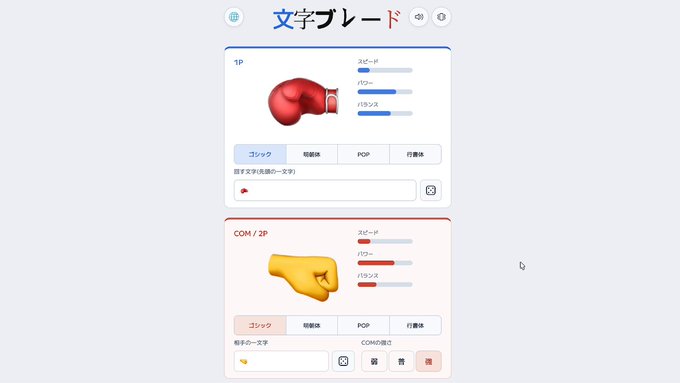
Moji Blade is a free browser game from creator ru that takes a single character or emoji and turns it into a 3D spinning top. You do not design a top from parts; you simply type or pick a character, and the game builds a physical top from its shape and font. That top then collides with others in an arena, and the last one standing wins.
The idea is simple but surprisingly deep. Because every character has a different outline, weight distribution, and set of pointed tips, the same letter in two fonts can behave completely differently in battle. A wide, round character may be stable but slow, while a thin, spiky one might hit hard but topple easily.
It has been recently trending because the premise is instantly shareable: watching a letter or emoji physically slam into another as a spinning top is funny and oddly satisfying. The creator has shown it in a short preview, and the community has already started making derivative works inspired by the concept.
- Any character works
Letters, numbers, symbols, and emoji are all valid inputs. The game reads the shape and turns it into a 3D top.
- Font matters
The font you use changes the top's outline, so the same character can feel fast, heavy, or unstable depending on the typeface.
- Instant battles
Matches are quick and browser-based, so you can test many characters in a short session without installing anything.
How the Spinning Tops Work: Shape, Speed, and Critical Hits
Each top is generated from the geometry of your chosen character. The game looks at the area the character covers, how round it is, and where its pointed tips are. Those factors translate into weight, stability, and the chance of landing a critical hit. A character with a large, solid area tends to be heavier and harder to knock out, while a character with sharp points can deal more damage on impact.
Speed and balance are also derived from the shape. A top that is wide and flat may spin steadily but move slowly, while a narrow, tall character might be fast but easy to tip over. This means there is no single best character; instead, you experiment to find a shape that matches your play style, whether you prefer to outlast opponents or strike quickly.
The game also includes stages that change how tops move. Rainbow boost pads accelerate you when you roll over them, elastic rings stretch and bounce your top back, and rotating floors spin and smoothly reverse direction over time. These elements add a layer of arena awareness on top of the character choice.
- Area and roundness
Larger, rounder characters generally have more weight and stability, making them harder to push out of the arena.
- Pointed tips
Sharp features can increase critical hit potential, giving aggressive tops a chance to deal decisive blows.
- Stage hazards
Boost pads, elastic rings, and rotating floors change movement and timing, so you must adapt your approach per stage.
How to Start Playing and Improve Your Odds
Since no public build or official page has been published yet, the best way to prepare is to understand the core loop. When the game becomes available, you will likely start in VS COM mode to test how different characters and fonts behave. This lets you see the top's speed, weight, and stability without the pressure of a live opponent.
Once you are comfortable, try the new stages to see how boost pads and rotating floors affect your movement. The rainbow boost pad gives a speed burst, which can be used to ram opponents or recover position. The elastic ring bends and bounces your top back, so you can use it defensively to avoid ring-outs. The rotating floor reverses direction over time, so you need to time your attacks and movements accordingly.
A good strategy is to pick a character with a shape that complements the stage. On a stage with many boost pads, a heavier top can use the speed to deliver powerful hits. On a rotating floor, a more stable top may resist slipping better. The creator has hinted that strong characters may vary by stage, so experimenting with different letters and emoji is encouraged.
- Test in VS COM first
Use computer opponents to learn how each character and font feels before facing other players.
- Use stage features
Boost pads for offense, elastic rings for defense, and rotating floors for timing-based plays.
- Experiment with fonts
Changing the font can dramatically alter a top's performance, so try the same character in multiple typefaces.
How It Compares and Who It Is For
Moji Blade sits in the same casual browser-game space as other quick, physics-based battle games. What sets it apart is the input: instead of choosing from a roster of predefined tops, you create one from any character you can type. That makes every match a small experiment, and it is why players enjoy sharing their findings with unusual symbols or emoji.
The game is designed for mobile phones and desktop browsers, and it is free to play. It runs smoothly on both, so you can jump in during a break without downloads. The controls are simple enough for anyone to pick up, but the shape and font system gives depth for players who want to optimize their top.
The main limitation right now is availability. The creator has only shown a short preview, and there is no public build or official page yet. If you want to try it, keep an eye on the creator's announcements and the official site for a release. In the meantime, you can think about which characters and fonts you want to test first.
- Unique input system
Any character or emoji becomes a top, making it more personal and experimental than fixed-roster battle games.
- Free and browser-based
No download required, and it works on mobile and desktop, so it is easy to try anywhere.
- Not yet released
Only a preview has been shown; check the official site for news on a public build.
Step-by-Step Guide
Wait for or find the public release
No public build or official page has been published yet. The creator has only shown a short preview, so the first step is to watch for an announcement. Check the official site and the creator's channels for a playable version.
Choose a character or emoji
Once you can play, type or pick any single character. It can be a letter, number, symbol, or emoji. The game will generate a 3D top based on its shape and font.
Test in VS COM mode
Start with computer opponents to learn how your chosen character moves. Try different fonts to see how the top's speed, weight, and stability change. This helps you find a shape you like.
Explore the new stages
Select stages from the Stage button before a VS COM or VS 2P match. Try the rainbow boost pad for speed, the elastic ring for bounce, and the rotating floor for timing challenges.
Refine your strategy
Use stage features to your advantage: boost into opponents, bounce back from the edge, and time your attacks on rotating floors. Experiment with different characters per stage to find strong combinations.
Frequently Asked Questions
Is Moji Blade free to play?
Yes, Moji Blade is described as a free browser game. It is designed to run on mobile phones and desktop browsers without any download. However, since no public build has been released yet, you should check the official site for final details on pricing and any potential in-game purchases.
What devices can I play it on?
The game is built for both mobile phones and desktop browsers. That means you can play on a smartphone, tablet, or computer as long as you have a modern browser. The creator has not specified any required operating system or browser version, so check the official site for compatibility notes when it launches.
How does the character-to-top conversion work?
The game analyzes the shape of your chosen character, including its area, roundness, and pointed tips. These properties determine the top's weight, stability, speed, and critical hit chance. The font you use also changes the outline, so the same character can behave differently in another typeface. Experiment to find what works best.
What are the new stages and how do they affect gameplay?
The update adds three stages: a rainbow boost pad that speeds you up, an elastic ring that stretches and bounces your top back, and a rotating floor that spins and smoothly reverses direction over time. These change movement and timing, so you need to adapt your strategy. You can select them from the Stage button before a match.
When will Moji Blade be available to the public?
No public build or official page has been published yet. The creator has only shown a short preview, and an app version is planned but not dated. To know when it becomes playable, watch the official site and the creator's announcements for a release. Until then, you can prepare by thinking about which characters and fonts to try first.