Key Takeaways
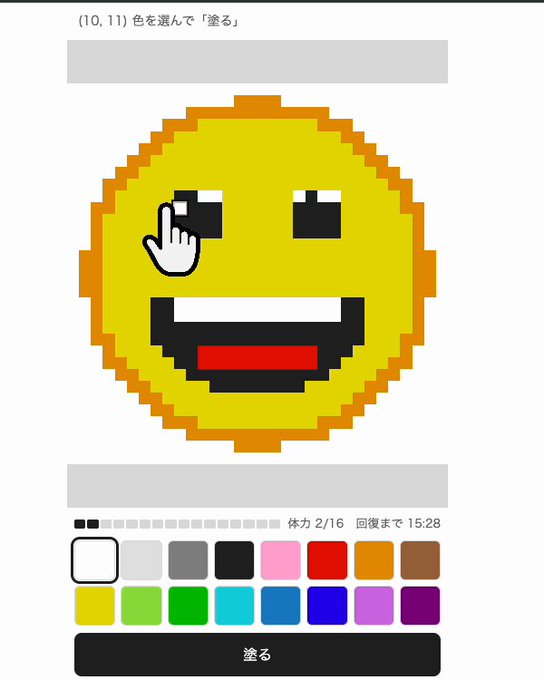
- One Pixel Per Hour is a free browser canvas where each person can paint a single pixel once every hour, announced by Japanese creator Todonero on October 14, 2026.
- The one-pixel ration means no individual can finish a drawing alone; images only appear when many visitors keep adding to the same shared canvas over time.
- There is no dedicated page for this title yet, so check the creator's official site, x282665.com, for the current link and any rules.
- The slow pace is the hook: your next pixel is an hour away, so the canvas looks slightly different every time you return.
Quick Facts
| Type | Collaborative pixel-art canvas in the browser |
|---|---|
| Devices | Any device with a modern web browser |
| Price | Free |
| Languages | Interface language not confirmed; check official site |
| Highlight | One pixel per person per hour on a shared canvas |
| Learning curve | Very easy to place a pixel; hard to coordinate |
| Category | Browser Games |
| Creator | トドネロ |
| Official site | x282665.com ↗ |
| Heat | 🔥 76K Heat |
| Last updated |
What One Pixel Per Hour Actually Is
One Pixel Per Hour is a browser-based drawing site built around a single, stubborn rule: each visitor can paint exactly one pixel every hour. The Japanese name, which translates literally to "a site where you can paint 1px per hour", says everything. There is one shared canvas and a strict ration. Creator Todonero announced it on October 14, 2026 with a short message: the site was made, and everyone can draw together.
That is the entire premise, and it is deliberately minimal. There are no levels, no timers counting down to a reward, and no solo mode. The canvas belongs to everyone who shows up, and whatever appears on it is the sum of thousands of tiny, separated decisions. Because the toolset is one pixel, the challenge is not dexterity but patience and coordination.
It arrives in a busy month for the same creator, who also released the Long Potato Cutting Game, a Turkish-ice-cream defense game and a calligraphy simulator. Compared with those, the pixel canvas is the quiet one. It does not try to grab you with speed or reflexes; it asks you to come back later, which is exactly why it is recently trending among players who want something slower.
- One pixel, one hour
The core limit is time, not skill. You place a single pixel, then wait roughly an hour before you can place another.
- A single shared canvas
Everyone works on the same surface, so your pixel can extend someone else's line, fill a gap, or start something entirely new.
- No way to finish alone
Even a simple shape takes many people and many hours, which turns the canvas into a group project by design.
How the One-Pixel Ration Changes the Way You Draw
In most drawing games you can fill an area in seconds. Here, every placement is a commitment. With one pixel an hour, a straight line of twenty pixels represents twenty hours of somebody's patience, possibly split across many different people. That scarcity forces you to think before you click: is this pixel better used to continue an existing shape, to repair a gap someone left, or to begin a new idea in empty space?
The ration also creates a natural rhythm. Your next pixel is an hour away, so you cannot binge. You check in, place one square, and leave. When you return, the canvas has shifted a little because other people were placing their pixels in the meantime. That slow, incremental change is the real entertainment, and it is why the format rewards curiosity more than competitiveness.
Coordination becomes the advanced skill. Since nobody can dominate the canvas through volume, groups that agree on a plan can achieve far more than lone visitors. The trade-off is that uncoordinated pixels can also be overwritten or surrounded by other people's ideas, and there is no confirmed mechanic for locking an area or protecting a drawing. Check the official site for the exact rules on placement and any protections.
- Think in lines, not pictures
Because you only get one square, the most useful move is usually extending an existing line or filling an obvious gap rather than starting a fresh drawing.
- Return on a schedule
Set a reminder roughly an hour after your last placement so you do not miss a cycle and waste the waiting time.
- Coordinate outside the canvas
Agreeing on a target shape with other players multiplies your impact, since a plan turns scattered pixels into a recognizable image.
- Expect slow results
A detailed picture can take days or weeks of collective effort, so treat progress as a long-term project rather than a quick win.
How to Join and Place Your First Pixel
Getting started is intentionally simple, but there is one practical catch: at the time of writing there is no dedicated page for this title. The announcement showed the canvas in a short video but carried no link, so the reliable route is the creator's official site, x282665.com, where the current link and any rules should appear. If you cannot find the canvas there yet, it may simply not be publicly linked, and the best move is to check back later.
Once you reach the canvas, the interaction is about as basic as a browser game gets. You look at the shared image, choose a color if a palette is offered, and click a single square to place your pixel. No download, no account requirement confirmed, and no complex controls. Because it runs in the browser, it should work on phones, tablets and desktops alike, though the exact interface behavior on small screens is worth verifying yourself.
After your pixel lands, the waiting begins. The hour-long cooldown is the whole game loop, so the skill is in how you use each return visit. Treat the first few placements as reconnaissance: study the canvas, identify active areas where other people are clearly building something, and decide whether to help or to claim empty space for your own idea.
- Find the canvas first
Start at the creator's official site, x282665.com, and look for the current link to the pixel canvas.
- Place one pixel
Pick a square on the shared canvas and click to paint it. That single placement is your contribution for the next hour.
- Wait out the cooldown
The ration resets roughly every hour. Use the time to plan your next placement instead of refreshing repeatedly.
- Watch the canvas evolve
Each return visit shows a slightly different picture, which is the main reward of the format.
How It Compares With Other Casual Browser Games
Most casual browser games compete for your attention with speed, streaks or escalating difficulty. One Pixel Per Hour does the opposite. It limits you to a single action per hour and then sends you away. That makes it closer to a long-running collaborative art project than to a typical arcade distraction, and it sits oddly but pleasantly alongside the creator's faster releases like the Long Potato Cutting Game and the Turkish-ice-cream defense game.
The obvious comparison is with other shared-canvas experiments, where large groups race to draw on one surface. Those tend to reward volume and speed, and they can be overwhelming for newcomers. The one-pixel-per-hour rule flattens that advantage: a first-time visitor has exactly the same power as a veteran, which makes the canvas feel fairer and far calmer, even if progress is much slower.
The limitations are real and worth stating plainly. There is no confirmed dedicated page yet, no confirmed moderation system, and no confirmed way to protect a drawing from being changed. If you want instant gratification or competitive scoring, this is not that game. If you enjoy watching something small grow over days, and you like the idea that your single square matters, it is one of the most unusual free browser experiments around right now.
- Fairness through scarcity
Everyone gets the same one pixel per hour, so no player can overwhelm the canvas with sheer volume.
- Patience over reflexes
Unlike reflex-based casual games, success here depends on returning consistently and coordinating with others.
- Unconfirmed details to verify
Rules on moderation, color palettes and pixel protection are not confirmed, so check the official site before assuming how it works.
- Who it is for
Best suited to patient, collaborative players who enjoy slow-burn projects rather than fast, score-driven play.
Step-by-Step Guide
Find the current link
There is no dedicated page for this title yet, so start at the creator's official site, x282665.com. Look for the pixel canvas there and note any posted rules before you begin.
Open the shared canvas
Load the canvas in any modern browser on phone, tablet or desktop. No download is needed, and the interface is designed around a single click action.
Choose your pixel and place it
Study the existing image, pick a color if a palette is available, and click one square. That placement is your entire contribution until the cooldown resets.
Wait out the hour
Your next pixel becomes available roughly an hour later. Use the downtime to decide whether to extend a line, fill a gap, or start something new.
Return and build on the work
Come back on schedule and place your next pixel where it helps most. Over many visits, small individual contributions combine into a recognizable shared drawing.
Frequently Asked Questions
Is One Pixel Per Hour free to play?
Yes, the game is listed as free and browser-based, so there is no download or purchase required to take part. You only need a device with a modern web browser and a little patience, since the one-pixel-per-hour limit is the real cost. Check the official site for any current terms or restrictions.
Where can I actually play it right now?
At the time of writing there is no dedicated page for this title, and the original announcement carried no link. The creator's official site, x282665.com, is the best place to look for the current link and any posted rules. If you cannot find it there yet, check back later.
Can I draw a whole picture by myself?
No, and that is the point. With only one pixel per hour, a simple shape can take many hours or days, and a detailed drawing is effectively impossible alone. The canvas only develops when many people keep adding to it, which makes coordination with other players the most valuable skill.
Does it work on phones and tablets?
Because it runs in the browser, it should work on phones, tablets and desktops without installing anything. The exact behavior of the interface on smaller screens is not confirmed, so it is worth testing on your own device. If the canvas feels cramped, a larger screen may be more comfortable.
What happens if someone paints over my pixel?
The available information does not confirm any protection or locking mechanic, so it is safest to assume other players can change pixels near or on top of yours. That uncertainty is part of the collaborative chaos. Check the official site for the exact rules on placement, overwriting and moderation before investing in a long-term drawing.