Key Takeaways
- Walking Smartphone is a free browser game by TomozoP, playable on the Zounoashi Games site (zounoashi.com) on phones and PCs.
- You tap the screen or press the Space key to alternate legs; holding the press lifts the leg higher, and releasing plants it forward.
- Your result is the distance you reach if the phone's top edge hits the ground and cracks the screen, or your finishing time if you cross 10 meters.
- Rhythm matters more than speed: steady, well-timed taps keep the heavy phone balanced, while mashing or pausing too long makes it topple.
Quick Facts
| Type | Browser-based casual balance game |
|---|---|
| Devices | Smartphones and PCs with a web browser |
| Price | Free to play on the official site |
| Languages | Japanese interface; check the official site |
| Highlight | One-tap control with timing-based leg lifts |
| Learning curve | Easy to start, tricky to master |
| Category | Browser Games |
| Creator | トモぞヴP |
| Official site | zounoashi.com ↗ |
| Heat | 🔥 72.3K Heat |
| Last updated |
A Phone That Walks, Not a Person Who Walks
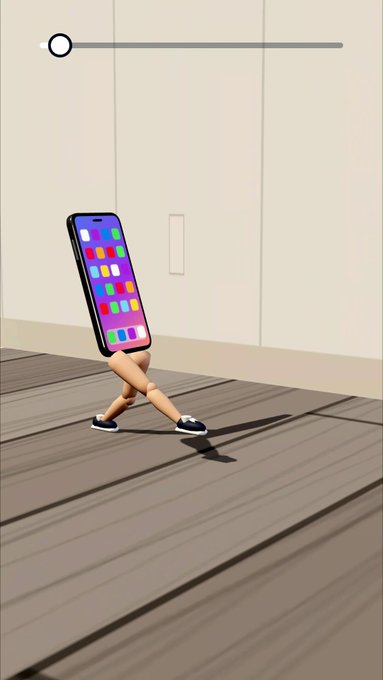
Walking Smartphone is a free browser game created by TomozoP and hosted on the Zounoashi Games site at zounoashi.com. The Japanese title, 歩くスマホ, is a playful twist on 歩きスマホ, the term for staring at your phone while walking. Here the joke is reversed: nobody is distracted, because the phone itself has sprouted a pair of human legs. Your job is to keep that top-heavy body upright as it marches forward, which makes the game a balancing act rather than a walking simulator.
The premise is simple enough to grasp in seconds, but the physics give it a tense, comedic edge. The phone is heavy, its legs are thin, and the ground is not perfectly flat. Every step shifts the weight, and a mistimed tap can send the whole thing tipping forward or backward. That contrast between a silly concept and a genuinely demanding control scheme is a big part of why the game recently became a trending topic. It runs directly in the browser, so there is nothing to install before you try it.
- One input, two legs
A tap on the screen or the Space key on a PC alternates the stepping leg automatically, so you never hunt for separate left and right buttons.
- Hold to lift, release to plant
The longer you hold, the higher the stepping leg's thigh rises; releasing swings the leg forward and plants the foot on the ground.
- A parody that plays straight
The title riffs on a familiar Japanese phrase, but the game treats its balance challenge seriously, which is where much of the humor comes from.
How the One-Tap Walking Mechanic Actually Works
The control scheme is deliberately minimal. On a phone, you tap anywhere on the screen; on a PC, you press the Space key. Each press switches which leg steps next, so the game handles the left-right alternation for you. What you control is not direction but timing and height. Holding the press lifts the stepping leg's thigh, and the longer you hold, the higher it rises. Releasing swings that leg forward and plants the foot, completing the step.
That means button-mashing is a trap. If you tap too fast, the legs scramble and the phone's weight shifts unpredictably; if you stop moving or mistime a step, the heavy body swings and you fall. The rhythm you are looking for is steady and deliberate, with each press held just long enough to clear the ground and each release timed so the foot lands cleanly. The game rewards observation: watch how the phone leans after each step and adjust your next press accordingly.
The path itself adds complications. There are stacked manga-style steps and an obstacle shaped like a toothpaste box. The box moves when you kick it, so the flat-ground stride that works early on may not carry you over it. You have to vary your leg lift and timing to clear these hazards without overbalancing. None of this is explained with a long tutorial; the game lets you discover the feel through repeated short attempts, which keeps the loop fast and the frustration low.
- Rhythm over speed
A steady interval between presses keeps the phone stable; frantic tapping usually ends in a fall.
- Watch the lean
After each plant, note whether the phone tips forward or back, then shorten or lengthen your next hold to correct it.
- Kick the box carefully
The toothpaste-box obstacle shifts when struck, so approach it with a controlled, lower step rather than a full-height stride.
- Short attempts teach fastest
Because a fall ends the run quickly, repeated short tries build timing intuition faster than one long cautious run.
Distance, Cracks, and the 10-Meter Finish Line
The scoring system is split into two outcomes. If the top edge of the phone touches the ground, the screen cracks and the distance you reached becomes your result. That crack is purely an in-game effect; the game never asks you to shake or drop a real phone. If you cross the 10-meter mark, the result switches from distance to your finishing time, so the goal becomes not just survival but speed. This two-mode result structure gives the game a natural difficulty curve: first you learn to stay upright, then you learn to move faster.
The 10-meter target is short enough that beginners can see the finish line in their mind, but long enough that the stacked steps and the movable box force real adjustments. Each fall teaches you where your rhythm broke, and each successful crossing invites you to try again for a better time. Because runs last only seconds, the retry loop is almost instant, which is a big reason the game works well as a casual browser distraction.
It is worth checking the official site for any updates to the rules or additional stages, since the published version is the source of truth. The game is playable on smartphones and PCs, and the simple tap-or-Space input means it works across a wide range of devices without special hardware. What it does not offer, at least in the version described here, is a long progression system or saved records; the appeal is the tight, repeatable challenge itself.
- Fall equals distance
When the phone's top edge hits the floor, the screen cracks and your run ends with the distance covered.
- Cross 10 meters for a time
Clearing the 10-meter mark switches your result to a finishing time, turning the game into a speed challenge.
- No real phone harm
The cracking screen is an animation inside the game; nothing requires you to handle a physical device roughly.
Who Will Enjoy It and How It Compares
Walking Smartphone sits in the same casual browser-game space as other one-button balance and timing games. Its closest cousins are titles where a single input controls a physics-driven body, and the fun comes from learning a feel rather than memorizing levels. Compared with endless runners, it is shorter and more precise: you are not dodging for minutes on end but trying to string together a handful of clean steps. Compared with physics puzzle games, it is more reflex-driven and less about planning.
The game is best suited to players who enjoy quick retries and small mastery curves. If you like chasing a personal best time or laughing at a ridiculous premise, it delivers both. If you prefer deep progression, story, or long sessions, it may feel thin after a few minutes. The Japanese-language interface may also be a hurdle for some international players, though the controls are simple enough to learn by trial. Check the official site for the current language options and any updates.
One limitation to keep in mind is that the published version has not been verified across every device and browser, so performance and touch responsiveness may vary. The game is free and browser-based, which keeps the barrier to entry low, but it also means you should treat any specific feature claims beyond what is described here as unconfirmed. The safest approach is to open the official site, try a few runs, and see how it feels on your own phone or computer.
- Best for quick breaks
Runs last seconds, making it a natural fit for short casual sessions rather than long play.
- Simple but not shallow
The one-tap input hides a real timing challenge, especially once you aim for a fast 10-meter time.
- Check before you commit
Language support and device compatibility are not fully confirmed, so verify details on the official site.
Step-by-Step Guide
Open the game in your browser
Go to the Zounoashi Games site at zounoashi.com and find Walking Smartphone. It runs directly in the browser on both smartphones and PCs, so there is no download or install step.
Learn the single input
Tap anywhere on the screen on a phone, or press the Space key on a PC. Each press alternates the stepping leg automatically, so you do not need to choose left or right.
Practice hold and release
Hold the press to lift the stepping leg's thigh; the longer you hold, the higher it rises. Release to swing the leg forward and plant the foot, then watch how the phone leans before your next press.
Clear the obstacles
Approach the stacked manga steps and the toothpaste-box obstacle with controlled, lower steps. The box moves when kicked, so adjust your timing rather than repeating the same stride.
Aim for 10 meters
If the phone's top edge hits the ground, the screen cracks and your distance is recorded. Cross 10 meters and your result becomes a finishing time, so retry to improve your speed.
Frequently Asked Questions
Is Walking Smartphone free to play?
Yes, the game is free to play directly in your web browser on the Zounoashi Games site at zounoashi.com. There is no download or installation required, and it works on both smartphones and PCs. Check the official site for any future changes to pricing or availability.
Do I need separate buttons for the left and right legs?
No. Each tap or Space press automatically alternates which leg steps next, so the game handles the left-right switching for you. Your control is over timing and how long you hold the press, not over choosing a leg. This makes the game easy to pick up on a touchscreen.
Why do I sometimes get a distance and sometimes a time?
If the top edge of the phone touches the ground, the screen cracks and your result is the distance you reached. If you cross the 10-meter mark, the result switches to your finishing time. That means early runs are about survival, while successful runs become a speed challenge.
What is the best way to avoid falling?
Focus on rhythm rather than speed. Hold each press just long enough to lift the leg, release cleanly, and watch how the phone leans after each plant. Steady, deliberate taps keep the heavy phone balanced, while mashing or pausing too long usually causes a fall.
Does the game work on all phones and browsers?
The game is designed for smartphones and PCs with a web browser, but performance and touch responsiveness may vary across devices. The published version has not been verified on every device, so try it on your own phone or computer. Check the official site for any compatibility notes or updates.