Key Takeaways
- Boss and the Mountain Pass is a free browser game by Japanese developer Oichi Konnyaku, playable directly on oichikonnyaku.com with no download.
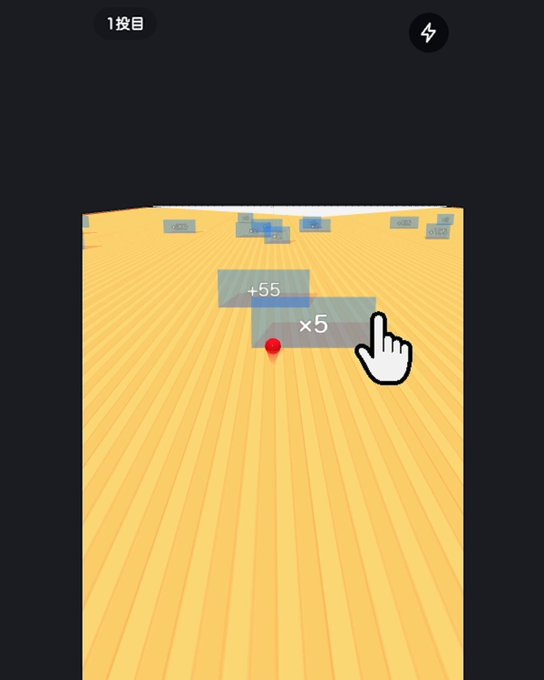
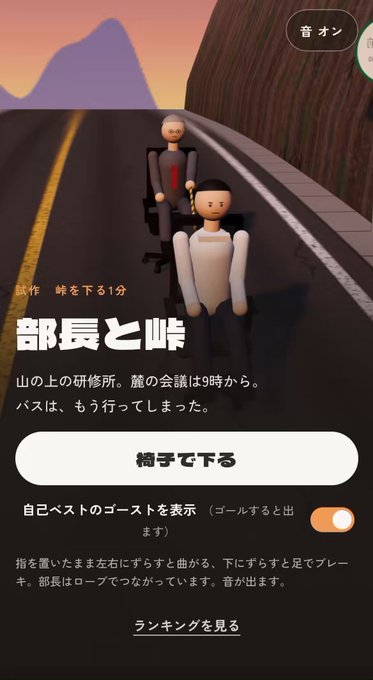
- You place a finger on the screen and slide left or right to steer, and slide down to apply a foot brake; the boss is tied to your chair with a rope.
- The title screen lets you change your companion's role, hairstyle and glasses, and toggle speech bubbles on or off.
- After finishing a run you can save a result image, enter a name for the ranking, and race against the ghost of your personal best.
Quick Facts
| Type | Free browser game, casual downhill racer |
|---|---|
| Devices | Mobile phones and desktop browsers |
| Price | Free; check the official site for details |
| Languages | Japanese; check the official site for other options |
| Highlight | Office chair downhill run with your boss in tow |
| Learning curve | Easy to start, tricky to master at speed |
| Category | Browser Games |
| Creator | 大市こんにゃく |
| Official site | oichikonnyaku.com ↗ |
| Heat | 🔥 684.3K Heat |
| Last updated |
A 9 A.M. Meeting, a Missed Bus and One Office Chair
The premise of Boss and the Mountain Pass is deliberately absurd. You are a new employee at a training lodge high on a mountain. A meeting starts at nine o'clock at the foot of the mountain, but the bus has already left without you. Your only option is to ride an office chair down the slope, with your boss tied to you by a rope. The game was announced by Japanese developer Oichi Konnyaku and is playable directly in the browser on the official site, oichikonnyaku.com, free of charge.
What makes it funny is the contrast between the mundane office setting and the downhill racing format. Instead of a car or a bike, your vehicle is a rolling desk chair, and your passenger is your superior. The rope connection means you are not just steering yourself; you are dragging someone else along, and their reactions become part of the entertainment. Players have been comparing clear times and how many times the boss fell, which gives the game a light competitive edge on top of the comedy.
Because it runs in a browser, there is nothing to install. You open the page, press the start button and you are on the slope within seconds. The game works on mobile phones and desktop browsers, so you can play it on a commute, at a desk, or anywhere you have a connection. If you are somewhere quiet, note that there is an audio toggle, so check that before you start.
- The setup
A new hire and their boss must reach a 9 a.m. meeting at the mountain's foot after the bus has left. The only transport is an office chair and a rope.
- The tone
The humor comes from the mismatch between a corporate training trip and a downhill racing game. The boss's reactions are a big part of the appeal.
- The format
It is a free browser game, so it launches instantly on phones and desktops without a download. Check the official site for the current version.
Slide to Steer, Slide Down to Brake: The Exact Controls
The control scheme is simple but not a tap-to-turn system. On a phone, you place your finger on the screen and keep it there. Sliding your finger left or right adjusts your direction, and sliding it down applies a foot brake. You are not tapping the screen each time you want to turn; the input is continuous, which means your finger position matters more than quick taps. On desktop, the same idea applies with your mouse or pointer.
Because steering and braking share the same touch, the skill is in how smoothly you move between them. A common beginner mistake is to hold a hard turn through a curve and then brake too late. Instead, try to make small left-right adjustments early, then slide down gently to scrub speed before the sharpest bends. The rope means your companion follows your line, so a jerky correction can swing the boss around and cost you time.
The game does not appear to use a separate accelerate button; gravity does the work. That makes the downhill sections feel fast and the braking decisions feel important. If you are new, spend your first few runs on gentle curves simply confirming that you can change direction and slow down reliably. Once those two actions feel natural, you can start chasing faster lines. The official site is the best place to confirm whether any control details have changed since launch.
- Steering
Place your finger on the screen and slide left or right. The input is continuous, so small early adjustments beat late hard turns.
- Braking
Slide your finger down to use a foot brake. Brake before the sharpest bends rather than in the middle of them.
- The rope
Your boss is tied to your chair, so your line affects them too. Smooth corrections keep the pair stable and save time.
- Audio
There is a sound toggle. If you are playing in public or at work, check it before you start your run.
Companion Settings, Ghost Runs and Sharing Your Result
The title screen offers more customization than you might expect from a one-button downhill game. You can change your companion's role, choosing from options such as department manager, section chief, president, senior colleague or peer, and you can also adjust their hairstyle and whether they wear glasses. This is a set of prepared choices rather than a photo-upload feature, so you are picking from what the developer provides. You can also toggle the speech bubbles on or off, which lets you separate a run where you enjoy the dialogue from a run where you focus purely on speed.
For players who want to improve, the ghost system is the main tool. The title screen and result screen include ghost settings, and during a run there is a display for your difference against your personal best. That means you can see in real time whether you are ahead or behind your own record. When you repeat the same course, try to notice which section you lost time in rather than only looking at the final number. That is a more useful way to improve than simply restarting over and over.
After you reach the goal, the result screen offers a result image and save or share options, plus a field to enter a name for the ranking. The game indicates that your result image will include your rank once you register, though your position depends on the records at that moment. The available sharing destinations can vary by device and browser, so if a particular option does not appear, that is likely why. Cross-device record syncing and the exact behavior of every ghost option have not been confirmed, so check the official site if those details matter to you.
- Companion customization
Change your companion's role, hairstyle and glasses from the title screen. Speech bubbles can be shown or hidden.
- Ghost comparison
Race against your personal best and watch the live difference display. Use it to find which section costs you time.
- Result sharing
Save a result image and enter a name for the ranking. Sharing options depend on your device and browser.
- What is unconfirmed
Cross-device syncing and the full behavior of every ghost setting have not been verified. Check the official site for specifics.
How It Compares and Who Will Enjoy It Most
Boss and the Mountain Pass sits in the same broad family as other casual browser games built around a single continuous input, such as endless runners and one-touch downhill games. What sets it apart is the premise and the rope mechanic. Instead of controlling a lone character, you are responsible for a second person who is physically attached to you. That adds a small layer of planning to your steering, because a bad line affects both of you, and it gives the game its comedic identity.
Compared with more complex racing games, this one is intentionally light. There is no vehicle tuning, no long campaign and no need to learn a large control set. The depth comes from mastering the slope, shaving seconds off your best time and learning where to brake. That makes it a good fit for short sessions: a few runs while you wait for something, or a longer session where you try to beat your ghost. It is also easy to show to someone else because the premise explains itself in seconds.
The limitations are worth knowing before you dive in. The game is presented in Japanese, and while the controls are simple enough to learn by experimenting, some menu text and dialogue may be harder to follow if you do not read Japanese. The ranking and sharing features depend on your device and browser, and the game is a browser title rather than a large-scale release, so do not expect extensive account systems or cross-device progression. If you enjoy quick, funny, skill-based browser games and do not mind a little trial and error, this one is easy to recommend.
- Similar games
Fans of one-touch downhill and endless runner browser games will recognize the format, but the rope-linked companion is a fresh twist.
- Best for short sessions
Runs are quick, so it suits a few minutes of play. Chasing your ghost gives it longer-term appeal.
- Language consideration
The game is presented in Japanese. The controls are learnable by feel, but menus and dialogue may be harder without Japanese.
- What to check
Ranking behavior, sharing options and any language support can change. Confirm current details on the official site.
Step-by-Step Guide
Open the game in your browser
Go to the official site, oichikonnyaku.com, on your phone or desktop. The game is free and runs directly in the browser, so there is no download or install step. Check the sound toggle before you start if you are in a quiet place.
Set up your companion
On the title screen, choose your companion's role, hairstyle and glasses. You can also decide whether speech bubbles appear. If you want to focus on speed, hide the bubbles; if you want the comedy, leave them on.
Learn steering and braking
Place your finger on the screen and slide left or right to steer. Slide down to apply the foot brake. Spend your first run on gentle curves confirming that you can change direction and slow down before you chase speed.
Race your ghost and refine your line
Enable the ghost of your personal best and watch the live difference display during the run. Note which section you lose time in, then adjust your braking points on the next attempt. Small, early corrections usually beat late hard turns.
Finish, save and compare
At the goal, review your clear time and how many times the boss fell. Save the result image, and if you want, enter a name for the ranking. Sharing options depend on your device and browser, so check what is available on your setup.
Frequently Asked Questions
Is Boss and the Mountain Pass free to play?
Yes, the game is free and playable directly in your browser on the official site, oichikonnyaku.com. There is no download required, and it works on both mobile phones and desktop browsers. If you want to confirm current pricing or any optional features, check the official site, since details can change after launch.
How do the controls work exactly?
You place your finger on the screen and keep it there. Sliding left or right steers your office chair, and sliding down applies a foot brake. It is not a tap-to-turn system, so your finger position is continuous. On desktop, the same idea applies with your mouse or pointer.
Can I change the boss or the other character?
Yes. The title screen lets you change your companion's role, with options such as department manager, section chief, president, senior colleague or peer. You can also adjust their hairstyle and whether they wear glasses. It is a set of prepared choices rather than a photo upload, and you can toggle speech bubbles on or off.
How do I improve my time?
Use the ghost of your personal best and watch the live difference display during the run. Focus on which section you lose time in rather than only the final number. Brake before the sharpest bends, make small early steering corrections, and keep your line smooth so the rope-linked boss does not swing around.
Can I share my result and join a ranking?
After you reach the goal, the result screen offers a result image and save or share options, plus a field to enter a name for the ranking. The game indicates your result image will include your rank once you register, though your position depends on the records at that moment. Available sharing destinations can vary by device and browser.