Key Takeaways
- Atiumani is a free browser game on game.hap.ne.jp where you draw along to an auto-advancing drawing song and only find out what the picture was meant to be at the end.
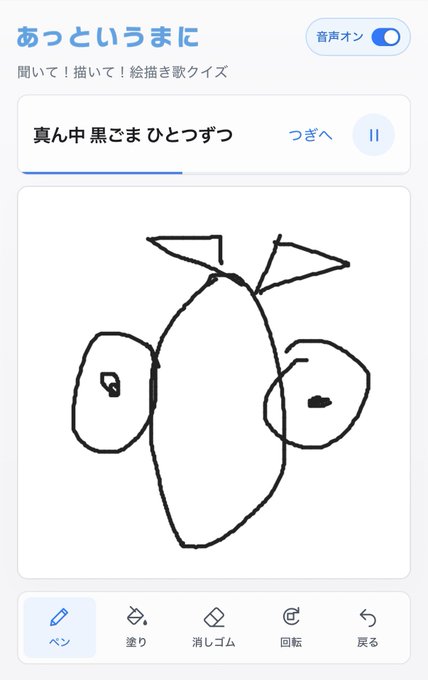
- You pick a daily prompt, a random prompt, or a three-digit numbered prompt, then use pen, fill, eraser, rotate, and undo tools while the lyrics guide your strokes.
- The song advances automatically, but pause and next controls let you draw at your own pace, so beginners can keep their lines steady.
- Enter the same three-digit number as a friend (000 to 999) and you both get the same prompt, making it easy to compare finished drawings.
Quick Facts
| Type | Browser drawing game with a drawing song |
|---|---|
| Devices | Smartphones and desktop browsers |
| Price | Free to play in the browser |
| Languages | Japanese interface; check the official site |
| Highlight | Answer check against a sample at the end |
| Learning curve | Very easy; pause controls help beginners |
| Category | Browser Games |
| Creator | ハップ |
| Official site | game.hap.ne.jp ↗ |
| Heat | 🔥 327.9K Heat |
| Last updated |
What Atiumani Is and Why It Is Trending
Atiumani Drawing Song, known in Japanese as あっというまに, is a free browser game from Hap Inc., a Japanese developer. The premise is simple: the game plays a drawing song, a traditional kind of tune whose lyrics tell you which lines to draw, and you follow along with your finger or mouse. Only at the end does the game show a sample so you can see what you were actually supposed to create. Hap Inc. announced the project in October 2026, and it has been recently trending.
The appeal comes from the gap between intention and result. Because the lyrics move forward automatically, you commit to each stroke before you know the full picture, and the final answer check turns every attempt into a small comic reveal. That mix of suspense, low stakes, and instant comparison is what makes people keep replaying and sharing their finished drawings with friends.
Unlike many casual web games, there is nothing to install and no account needed. You open the page on game.hap.ne.jp, choose a prompt, and start drawing in the browser. It works on smartphones and desktop browsers, so the same game fits a quick phone break or a longer session at a computer. The Japanese interface is central to the experience because the lyrics are the instructions.
- A drawing song, not a silent tutorial
The lyrics themselves tell you what to draw, so listening is part of the gameplay rather than background music.
- The reveal is the point
You draw without seeing the target, then compare your picture with the sample at the end for a satisfying answer check.
- Made by Hap Inc.
The developer is known for small, playful browser games, and Atiumani follows that pick-up-and-play style.
Controls, Tools, and How a Round Plays Out
A round starts when you choose a prompt from the entrance screen. The main options are today's prompt, a random prompt, a collaboration prompt, and a numbered prompt. After that, the drawing song begins and the lyrics advance on their own. Your job is to translate each line into a shape using the drawing tools, even though you may not yet know what the finished picture represents.
The toolset is compact: pen, fill, eraser, rotate, and undo. The pen handles outlines, fill lets you add color to enclosed areas, and the eraser cleans up mistakes. Rotate is useful when a lyric asks for a curve or angle that feels awkward on a phone screen, and undo is your safety net when a stroke goes wrong. These are the only tools the notes confirm, so treat anything else as something to check on the official site.
The song advances automatically, but you are not trapped by its pace. Pause and next controls let you stop the lyrics or move ahead, so you can draw at your own speed. That matters on a small touchscreen, where steady lines take a moment. When you finish, the game shows your drawing next to a sample, and you can return to drawing if you want another attempt.
- Use pause early and often
Pausing the lyrics gives you time to steady your hand, especially for circles and long curves on a phone.
- Fill after outlining
Draw closed shapes first so the fill tool has clear boundaries, then add color where the song suggests it.
- Rotate beats redrawing
If a line feels unnatural at your current angle, rotate the canvas instead of erasing and starting over.
- Undo is cheaper than fixing
A quick undo after a stray stroke keeps the picture clean and saves time before the answer check.
Prompt Modes and Playing with Friends
The entrance screen offers several ways to pick a subject. Today's prompt is a shared daily theme, and the official guidance says it updates every day at midnight Japan time. Random prompt is for when you just want to draw. The collaboration prompt is a special themed option, and the numbered prompt lets you type a three-digit number from 000 to 999 to lock in a specific subject.
The numbered mode is the social heart of the game. If you and a friend enter the same three-digit number, you both get the same drawing song and the same target picture. Each person presses start on their own device, so you do not need a lobby or a link. Afterward, you can compare finished drawings and see how differently two people interpreted the same lyrics.
The official guidance also notes that when sharing an image of today's prompt, the answer and sample should be hidden so you do not spoil the reveal for others. That small courtesy keeps the answer check fun for everyone. The game does not require registration, and the official terms state that drawings are processed on your device and are not sent to or stored on the service's servers.
- Daily prompt resets at midnight JST
If you want to play the same theme as a friend in Japan, coordinate around the Japan time reset.
- Same number, same song
Agree on any number from 000 to 999, enter it on both devices, and you are playing the same round.
- Hide the answer when sharing
For today's prompt, keep the sample and answer out of shared images so others can enjoy the reveal.
Strategy, Limitations, and Who It Suits
The best strategy is to stop trying to guess the final picture and focus on the current lyric. Each line usually describes one part of the drawing, so a clean, simple shape for that line is worth more than a detailed guess at the whole. Keep strokes light, use undo freely, and let the song guide the order. If you fall behind, pause rather than rush, because messy lines are harder to correct later.
It helps to treat the game as a listening exercise. The lyrics are the instructions, so audio should be on if you can manage it. Reading along on screen is possible, but the rhythm of the song is part of the fun. On a phone, use your finger for broad shapes and rotate the canvas for tight curves. On desktop, a mouse works fine, though a touchscreen or stylus may feel more natural.
Compared with other casual browser drawing games, Atiumani stands out because you do not see the target while drawing. That makes it closer to a quiz than a coloring app, and the answer check is the payoff. The trade-off is that results depend on how well you follow the song, and the experience is built around Japanese lyrics. The notes do not confirm an English version, so check the official site if language support matters to you. It suits short breaks, classrooms, and friend groups rather than long solo sessions.
- Draw the lyric, not the guess
Following each line literally produces a cleaner result than trying to sketch a guessed final image.
- Keep audio on
The song carries the timing and instructions, so sound makes the round easier and more enjoyable.
- Language caveat
The interface and lyrics are in Japanese in the notes; confirm any other language options on the official site.
- Best for quick group fun
The numbered mode and answer check make it a natural fit for friends comparing results, not for serious drawing practice.
Step-by-Step Guide
Open the game and choose a prompt
Go to game.hap.ne.jp in your browser and pick today's prompt, a random prompt, a collaboration prompt, or a numbered prompt. For a first round, today's prompt is the easiest way to join what others are playing that day.
Turn on audio and start the song
Make sure your device volume is up, because the drawing song tells you what to draw. Press start and listen to the first lyric before you touch the canvas, so you know which shape to begin with.
Draw with the pen, fill, eraser, rotate, and undo tools
Follow each lyric using the pen for outlines and fill for color, and use the eraser or undo when a stroke goes wrong. Rotate the canvas when a curve feels awkward, and pause the song whenever you need more time to finish a line.
Pause or skip as needed
The lyrics advance automatically, but the pause and next controls let you set your own pace. Pause for tricky sections, then resume when your lines are steady, so you do not fall behind the song.
Check the answer and compare with the sample
When the song ends, the game shows your drawing next to a sample so you can see what you were meant to create. If you want another try, return to the drawing screen, or share the result with a friend using the same numbered prompt.
Frequently Asked Questions
Is Atiumani Drawing Song free, and do I need to install an app?
Yes, it is free to play in your browser on game.hap.ne.jp. There is no dedicated app to install and no account registration required according to the available information. Just open the page on a smartphone or desktop browser and start a round.
How do I play the same prompt as a friend?
Choose the numbered prompt mode and enter a three-digit number from 000 to 999. If your friend enters the same number on their own device, you both get the same drawing song and target. Each person presses start separately, so no invitation or link is needed.
When does today's prompt change?
The official guidance says today's prompt updates every day at midnight Japan time. If you are in another time zone, that may fall during your daytime or evening, so plan around the Japan time reset if you want to play the same daily theme as someone in Japan.
Are my drawings uploaded or saved on a server?
The official terms state that drawings are processed on your device and are not sent to or stored on the service's servers. That means your picture stays local, though you should still check the official terms yourself for the full details before relying on that for sensitive use.
Does it work on phones, and is there an English version?
It works on smartphones and desktop browsers, and the touch controls suit finger drawing on a phone. The notes describe a Japanese interface and Japanese lyrics, and do not confirm an English version. Check the official site at game.hap.ne.jp for the current language options and device support.