Key Takeaways
- Cruising Bones is a free 3D downhill skateboarding game that runs entirely in a web browser at cruisingbones.com, with no download or install required.
- You steer a skateboard down a continuous downhill slope, managing speed and direction to avoid obstacles and stay upright; the current build is an alpha, and multiplayer is marked as coming soon.
- It was built by independent developer 0xMarioNawfal using Claude Code and Claude AI, with art from Magnific and Tripo and the BabylonJS engine, reportedly in about ten days.
- The game works on both mobile phones and desktop browsers, and the best early tip is to make small steering corrections before steep sections to keep speed under control.
Quick Facts
| Type | 3D downhill skateboarding browser game |
|---|---|
| Devices | Desktop and mobile web browsers |
| Price | Free |
| Languages | Check the official site |
| Highlight | Built solo with Claude Code and AI art tools |
| Learning curve | Easy to start, tricky to master at speed |
| Category | Browser Games |
| Creator | 0xMarioNawfal - The Roundtable Show |
| Official site | cruisingbones.com ↗ |
| Heat | 🔥 47.9K Heat |
| Last updated |
What Cruising Bones Is and Why It Is Suddenly Everywhere
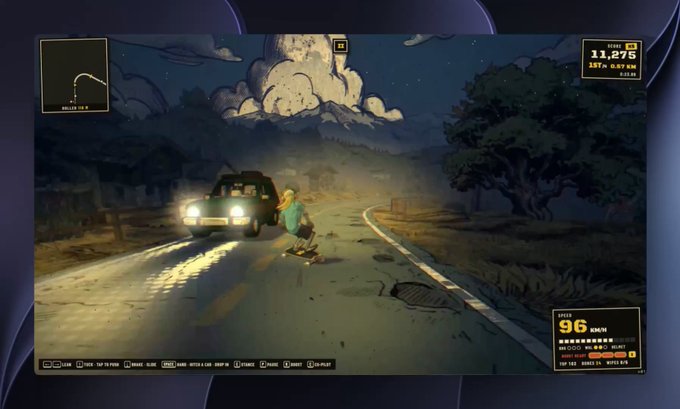
Cruising Bones is a free 3D downhill skateboarding game that you play directly in a web browser. You control a skateboarder on a continuous downhill slope, steering to dodge obstacles and keep your board upright while gravity pulls you faster and faster. There is nothing to install: you open cruisingbones.com and the game loads like a normal web page. The project comes from independent developer 0xMarioNawfal, who also runs The Roundtable Show, and it was announced on October 25, 2026.
What makes it noteworthy is not just the game but how it was made. The developer says he started on October 14 and posted his third update about ten days later, using Claude Code and Claude AI to write the game, Magnific and Tripo for art assets, and BabylonJS as the 3D engine. That combination produced a game that looks far more polished than most solo browser projects, which is exactly why people are searching for it right now.
The current build is described as an alpha, and multiplayer is marked as coming soon. That means the core single-player downhill experience is playable today, but you should expect rough edges, changing physics, and features that may appear or shift over time. If you are deciding whether to try it, treat it as an early but genuinely playable slice rather than a finished commercial game.
- Free and instant
There is no cost and no download. Opening the site in a modern browser is the entire setup process.
- Alpha status
The developer labels it an alpha, so expect balance changes and unfinished areas. Multiplayer is listed as coming soon but is not available yet.
- Built with AI tools
Claude Code and Claude AI handled development, while Magnific and Tripo generated art, all on the BabylonJS engine.
How the Downhill Run Actually Works: Controls, Speed and Staying Upright
The premise is simple and physical. You are on a skateboard at the top of a hill, and the slope does the accelerating for you. Your job is to steer left and right to avoid obstacles and to keep the board from tipping over. Because the hill is continuous rather than split into separate levels, the challenge comes from the terrain itself: steep sections push your speed up, and the faster you go, the less time you have to react.
Speed management is the real skill. If you hold a straight line down a steep drop, you will pick up velocity quickly and small mistakes become large crashes. Experienced players make many tiny steering corrections instead of a few big ones, using gentle carving to bleed off speed and line up clean paths through obstacles. On gentler sections you can relax and let the board roll, then tighten up again before the next pitch.
The game runs on the BabylonJS engine, which is a well-known JavaScript framework for 3D web graphics. That choice is why it can render a full 3D downhill scene inside a browser tab on both phones and desktops. The alpha is reported to run smoothly on both, though performance will naturally depend on your device and browser. Exact control schemes, scoring rules, and win conditions are not fully documented in the current build, so check the official site for the latest details.
- Small corrections win
Tap or nudge your steering repeatedly rather than holding a hard turn. Tiny adjustments keep you stable at high speed.
- Read the slope ahead
Look down the hill, not at your board. Steep sections are where speed spikes, so set your line before you enter them.
- Carve to slow down
Gentle side-to-side carving scrubs speed without stopping you, which is safer than slamming into an obstacle.
- Expect alpha quirks
Physics and scoring may change between updates. If something feels inconsistent, it is likely a work-in-progress detail.
Getting Started: From Opening the Site to Your First Clean Run
Starting is deliberately frictionless. You do not create an account, download a launcher, or install anything. You open cruisingbones.com in a browser, wait for the 3D scene to load, and you are on the board. That low barrier is a big part of the appeal for a casual web game: you can try it in a spare five minutes on a laptop or phone and decide immediately whether the feel clicks for you.
Your first few runs should be about calibration rather than distance. Learn how strongly the board responds to your input, how quickly speed builds on a steep grade, and how much room you have to correct before an obstacle. Once you can hold a line without oversteering, start experimenting with deliberate carving to control your pace. This is the point where the game shifts from chaotic to satisfying.
Because it is an alpha, keep an eye on the official site for updates, especially around multiplayer, which is marked as coming soon. If you run into performance issues, try a different browser or a device with more graphics headroom, since 3D web games lean heavily on your GPU. For a free browser game, the sensible approach is to enjoy what is there now and revisit it as the developer ships changes.
- Use a modern browser
Chrome, Edge, Firefox, and Safari all support the kind of 3D rendering BabylonJS needs, but keep them updated for best results.
- Desktop first, then mobile
A larger screen makes it easier to read the slope ahead. Once you know the layout, mobile play is a convenient way to squeeze in runs.
- Watch for updates
The developer has been posting progress updates, and multiplayer is flagged as coming soon, so the feature set is likely to grow.
How It Compares to Other Casual Browser Games, and Who Should Play
Most casual browser games are either tiny 2D time-wasters or heavyweight downloads disguised as web apps. Cruising Bones sits in an unusual middle ground: it is a genuine 3D game with a continuous physics-driven slope, yet it loads like a simple web page and costs nothing. Compared with endless-runner style games, it leans more on momentum and balance than on reflex-based jumping, which gives it a distinct, slightly more sim-like feel.
Its closest cousins are other physics-driven downhill and skating games, where the fun comes from flow, speed, and the tension between going fast and staying in control. Cruising Bones is less about tricks and combos and more about survival and line choice. That makes it approachable for newcomers but still interesting for players who enjoy optimizing a route and shaving off mistakes run after run.
The biggest caveats are its alpha status and the limited information about scoring and progression. If you want a fully finished game with clear goals and leaderboards, this may not satisfy you yet. If you enjoy early builds, watching a project evolve, and the novelty of a solo developer plus AI tools producing a polished 3D experience, Cruising Bones is well worth a look. Check the official site for the current feature list before you commit serious time.
- Versus endless runners
Endless runners reward quick jumps and pattern memory. Cruising Bones rewards speed control and smooth carving on a continuous slope.
- Versus skate sims
Traditional skate games focus on tricks and combos. Here the focus is downhill survival and staying upright at speed.
- Best for
Players who like physics-driven flow, short browser sessions, and trying early builds of indie projects.
- Not ideal for
Anyone wanting a finished, feature-complete game with documented scoring, progression, and multiplayer right now.
Step-by-Step Guide
Open the game in your browser
Go to cruisingbones.com on a desktop or mobile browser. No account, download, or payment is needed. Wait a moment for the 3D scene to load, then you will be placed on the board at the top of the slope.
Learn the steering feel
Start with a slow, cautious run and focus only on how the board responds to your input. Make small left and right adjustments and notice how quickly the board turns. This calibration run matters more than distance covered.
Manage your speed on steep sections
As the slope steepens, your speed climbs fast. Begin carving gently side to side before the drop to bleed off speed, and avoid holding a hard turn. Keeping a controlled pace gives you time to react to obstacles.
Practice obstacle avoidance and clean lines
Once you can hold a stable line, start planning your route a few seconds ahead. Look down the hill rather than at your board, and aim for the widest gaps. Repeat runs to memorize where obstacles cluster and where speed spikes.
Check for updates and multiplayer
The game is an alpha and multiplayer is marked as coming soon. Revisit the official site periodically to see new features, balance changes, and any added modes. If performance stutters, try another browser or device.
Frequently Asked Questions
Is Cruising Bones free to play?
Yes, Cruising Bones is free to play in your web browser at cruisingbones.com. There is no download, no account creation, and no payment required to start. Because it is an alpha, the developer may add or change features over time, so check the official site for the most current information about pricing and availability.
What devices can I play Cruising Bones on?
It runs in desktop and mobile web browsers, so you can play on a laptop, desktop, or phone without installing anything. Performance depends on your device and browser, since 3D web games rely on your graphics hardware. If it feels sluggish, try a different browser or a device with more graphics power.
How do you control the skateboard in Cruising Bones?
You steer left and right to keep the board upright and avoid obstacles while gravity accelerates you downhill. The exact input method may vary between desktop and mobile, and the alpha does not fully document every control. The core skill is making many small steering corrections rather than a few large ones, especially on steep sections.
Is there a scoring system or win condition?
The current alpha focuses on the downhill run itself: staying upright, avoiding obstacles, and managing speed. Detailed scoring rules and win conditions are not fully documented in the available information. Check the official site or in-game prompts for the latest details, since these systems may be added or refined as development continues.
Who made Cruising Bones and how was it built?
Independent developer 0xMarioNawfal, who also runs The Roundtable Show, built the game. According to his account, he started on October 14 and posted his third update about ten days later, using Claude Code and Claude AI for development, Magnific and Tripo for art, and BabylonJS as the 3D engine. The result is a solo project that looks unusually polished for its scale.